Building a reusable integration flow for supported API connections. Connecting one app is easy. The hard part is a system that holds up across CRMs, ecommerce tools, webhooks, custom APIs, attribution, automation triggers, and whatever gets added next, without redesigning everything each time. That's the part I wanted to solve.
My role
Led UX strategy and the end-to-end design. Flows, states, validations, UI, QA
Team
Cross-functional. A PM, a developer, and me on design and UX strategy
Challenge
Turn many different API setups into one product experience
Outcome
A connector used to take 3 to 4 weeks. It now takes ~2, and the first parallel batch shipped 4 new connectors in 3 weeks
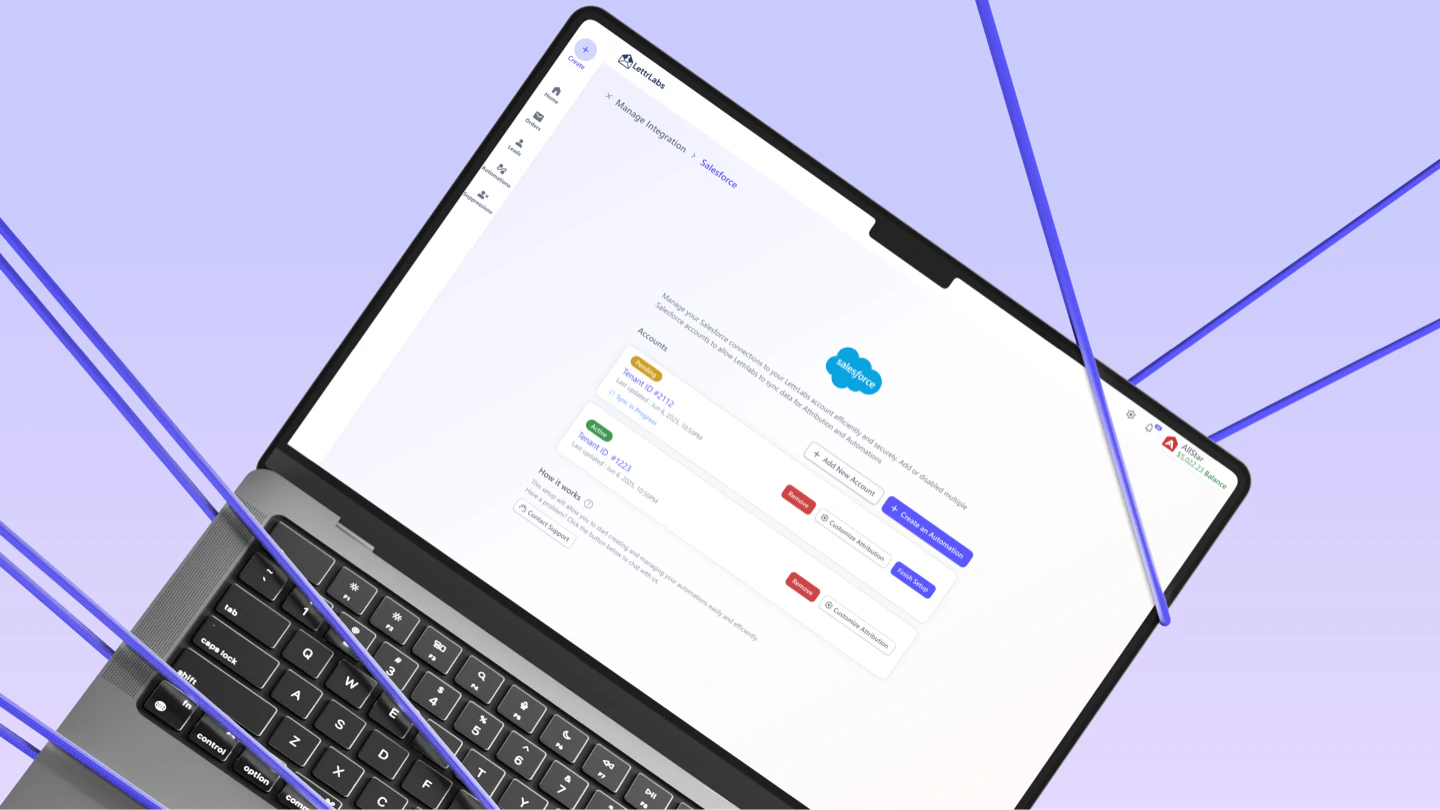
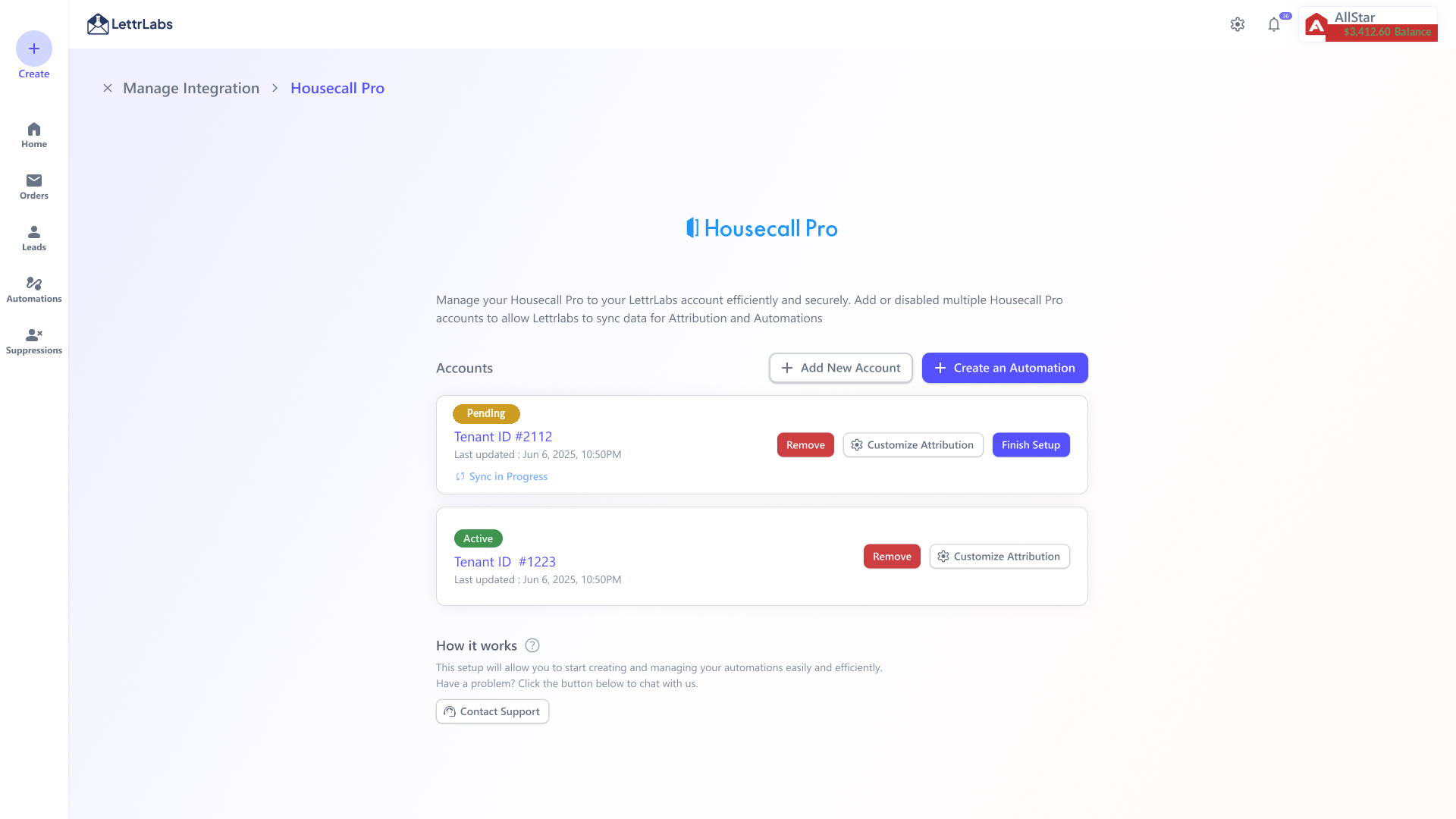
Manage Integration. Connected accounts with status and sync details, plus add-account, automation, and attribution actions
The final management screen. Connected accounts, status, attribution setup, and next actions.
Summary
The problem
Customer data lived across 6 separate tools and every connector was a one-off build. 32% of customers already automate from an integration and ~$350K of mail/month runs on that data. Even so, 12 tickets/month asked for new connectors and 16/month came from people stuck setting one up (3 in 10 couldn't finish). Each of those pulled in CS, Sales, and engineering. (Figures from internal product analytics, rounded.)
My part
Led the UX strategy and end-to-end design for one reusable integration framework. I built it as a system around a shared connect → test → attribute → manage lifecycle, so a new connector ships as configuration, not a redesign. Worked with a PM and a developer.
The outcome
A connector used to take 3 to 4 weeks. It now takes ~2. In the first 3-week parallel batch we shipped 4 new connectors. One of them was Salesforce, asked for by a client worth ~500K mails.
Build one integration framework we could reuse, so connecting a third-party app feels familiar, quick, and safe even when the APIs, fields, and business logic underneath are nothing alike.
One management screen holds connected accounts, their status and sync details, attribution setup, and the next action. Every connector lives in the same place.
Discovery
Integration Development Problem
LettrLabs wants to be the one-stop shop for direct mail. Customers keep their leads, purchases, jobs, and CRM activity spread across many platforms though. Every new connector had been its own build, so the same slow, expensive path repeated each time.
So I reframed it. The job wasn't "add one more app." It was the gap between how a new integration should reach a customer and how it actually did.
Data
$350K/moof direct mail already runs on customer-integration data
32%of customers build automations from a connected integration
28/mosupport tickets. 12 asking for a new connector, 16 stuck setting one up. Every one pulled in CS, Sales, and engineering
3 to 4 → 2 wksper-connector lead time after the reusable pattern replaced one-off flows
4 in 3 wksnew connectors on the first run. Salesforce, ServiceTitan, HubSpot, Housecall Pro
1 patternone lifecycle that new connectors slot into as configuration, not a redesign
Tickets
The support queue and the analytics agreed. Integrations were already central to how customers got value, but the way we built and set them up didn't scale. Before I drew a screen, I let the evidence point at the pattern.
What we saw
What it told us
12 tickets / mo
Customers were actively asking for connectors we didn't have yet. That's unmet demand, not a hypothesis. The queue was telling us where to expand.
16 tickets / mo
The setup itself was the blocker. Every one pulled in Customer Success, Sales, and engineering just to get a customer connected.
3 in 10 users
Couldn't add their account and trigger an automation on their own. The flow was failing before anyone got anything out of it.
32% · $350K/mo
A third of customers already automate from an integration, and ~$350K of mail a month rides on that data. Integrations were core infrastructure, not a nice-to-have.
6 one-off builds
Each connector had been designed and built separately, 3 to 4 weeks each, so the roadmap couldn't add sources fast enough to keep up with demand.
1 key client
One client worth ~500K mails asked for Salesforce. That put a number on what it cost us not to have a pattern that scaled, and made it urgent.
Integration Journey
Expected
1
The business picks what to connect
Customers, engineering, and the business agree on which integrations are worth building, guided by what customers actually ask for.
2
Engineering builds it once, consistently
Devs put their time into a proper data pipeline and reuse the same workflow for every integration instead of rebuilding the setup.
3
The customer uses it within a week
Once it's released, the connector is familiar and self-serve, so the customer connects and starts automating within a week.
Reality
1
The request waits a month to be heard
A customer asks for an integration. It takes at least a month just to reach management and get prioritized, and that's before any design or build starts.
2
Every build is researched from scratch
Devs research the data pipeline, then work with product to design the data model and handle each API's quirks. A fresh custom effort every time.
3
The customer hits a brand-new flow
They finally use it, but it's another unfamiliar process. They hit problems or get stuck, and support gets pulled right back in.
Blocker
No single screen looked wrong. Connecting an app just kept stalling. So I listed every blocker and paired it with the fix the reusable pattern shipped.
Blocker
Fix
A request waited ~a month just to get prioritized. Then every connector was built from scratch, 3 to 4 weeks each.
One reusable lifecycle turns a new connector into configuration. Logo, name, fields, attributes. It ships as setup, not a project.
16 tickets a month came from users stuck in setup, and 3 in 10 couldn't finish connecting on their own.
A guided connect → test → confirm → manage flow that tests credentials before it saves and explains every wait, so users can do it themselves.
Attribution was buried in a heavy, data-engineering setup marketers couldn't finish.
Attribution became its own short, explicit step. You confirm which statuses count as a Lead or Conversion, and a live warning fires if nothing would attribute.
Every API has its own quirks, like custom objects, renamed fields, and multiple pipelines. They broke any one-size-fits-all guess.
A checkbox-grid mapping handles multiple pipelines and non-linear stages out in the open, in the marketer's own language.
Success and failure states lived on one screen, so users lost track of what was active, syncing, or failed.
Status shows in the account list and in-app notifications, whether that's active, sync-in-progress, failed, or ready for the next step.
Every connector was designed and maintained separately across product and engineering.
One pattern devs reuse and the product team scales. New sources slot in as configuration, not a redesign.
Process
Drafts
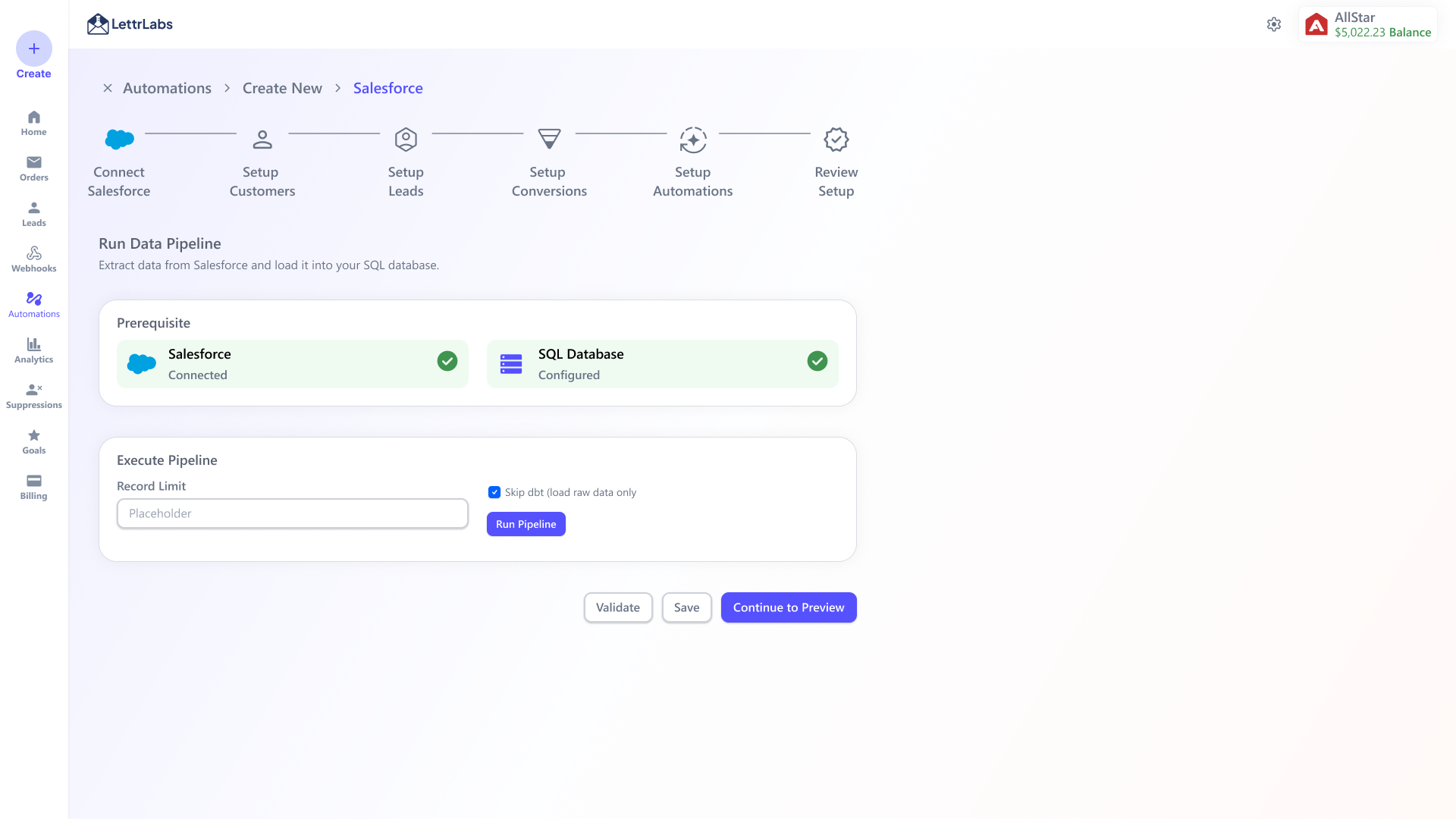
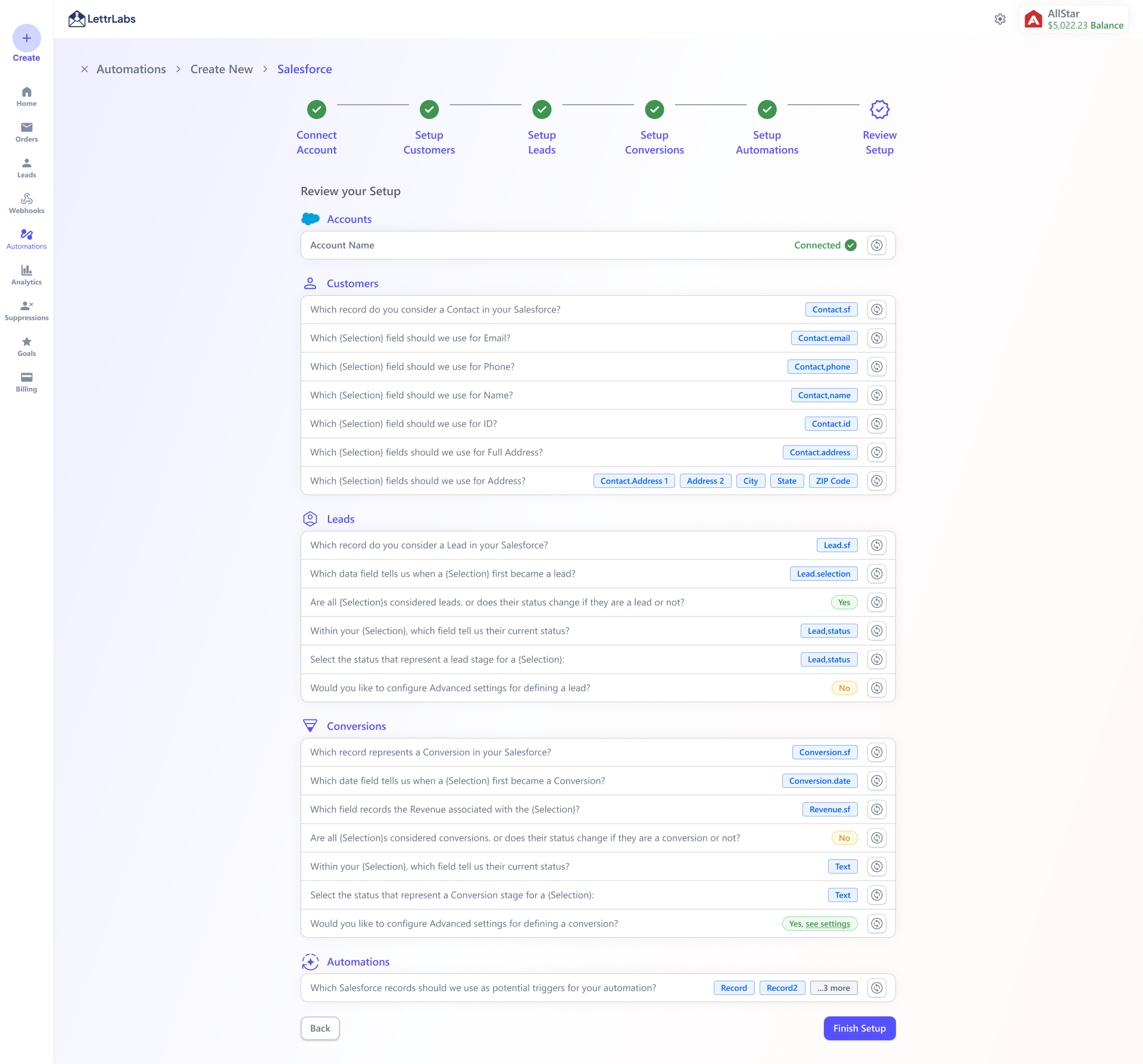
The first design was far more powerful. To connect a CRM like Salesforce, you'd browse the entire schema, hand-map every object and field to the attribution model, define conversion/lead/exclude rules, then run a full extract-and-load pipeline into SQL. It could model almost anything, and that was exactly the problem.
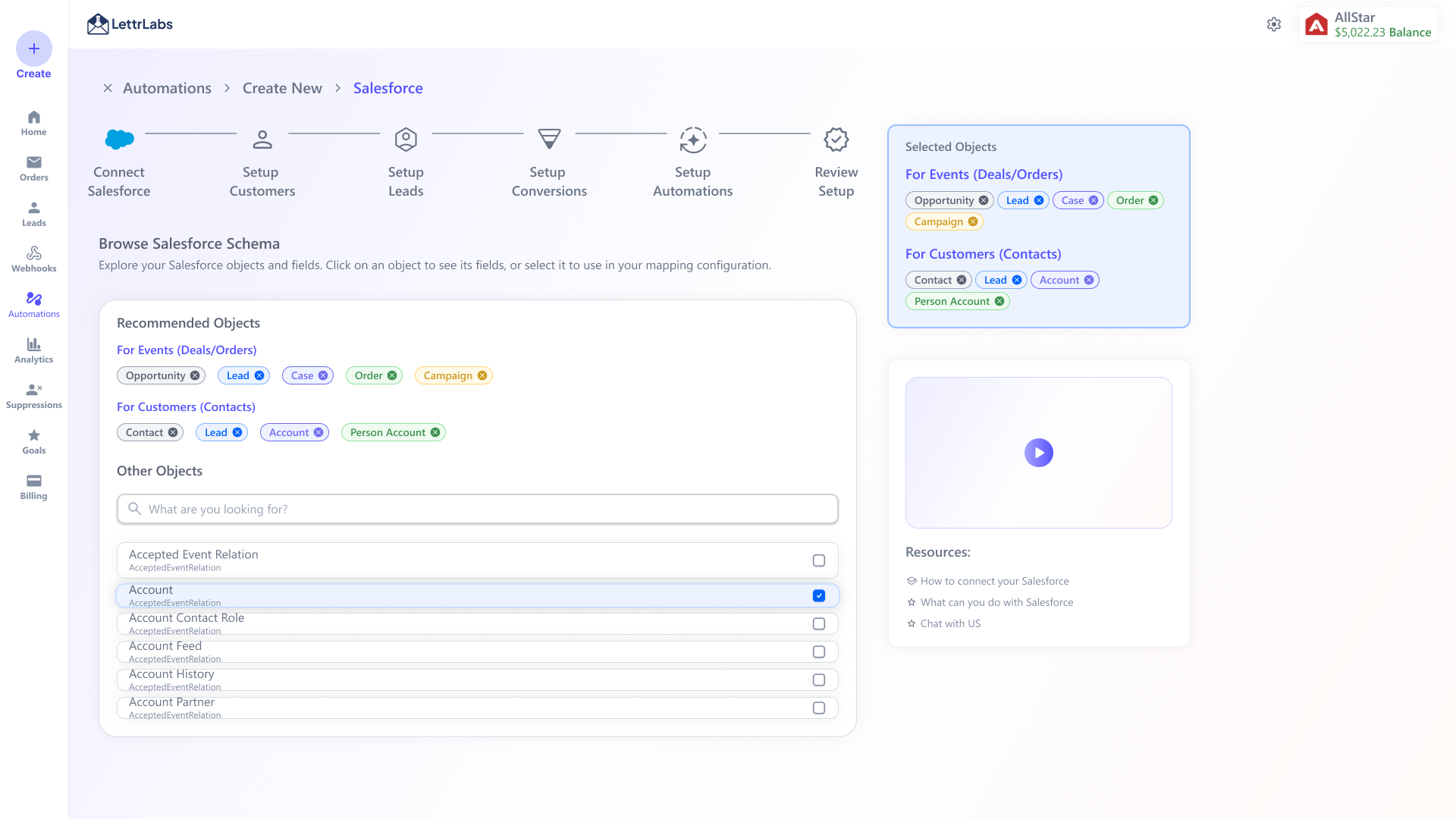
Not shipped · V1 · step 01
Browse the CRM schema.
The advanced path opened with the whole Salesforce object model and asked the user to pick what mattered. Opportunity, Lead, Case, Order, Campaign, Contact, Account.
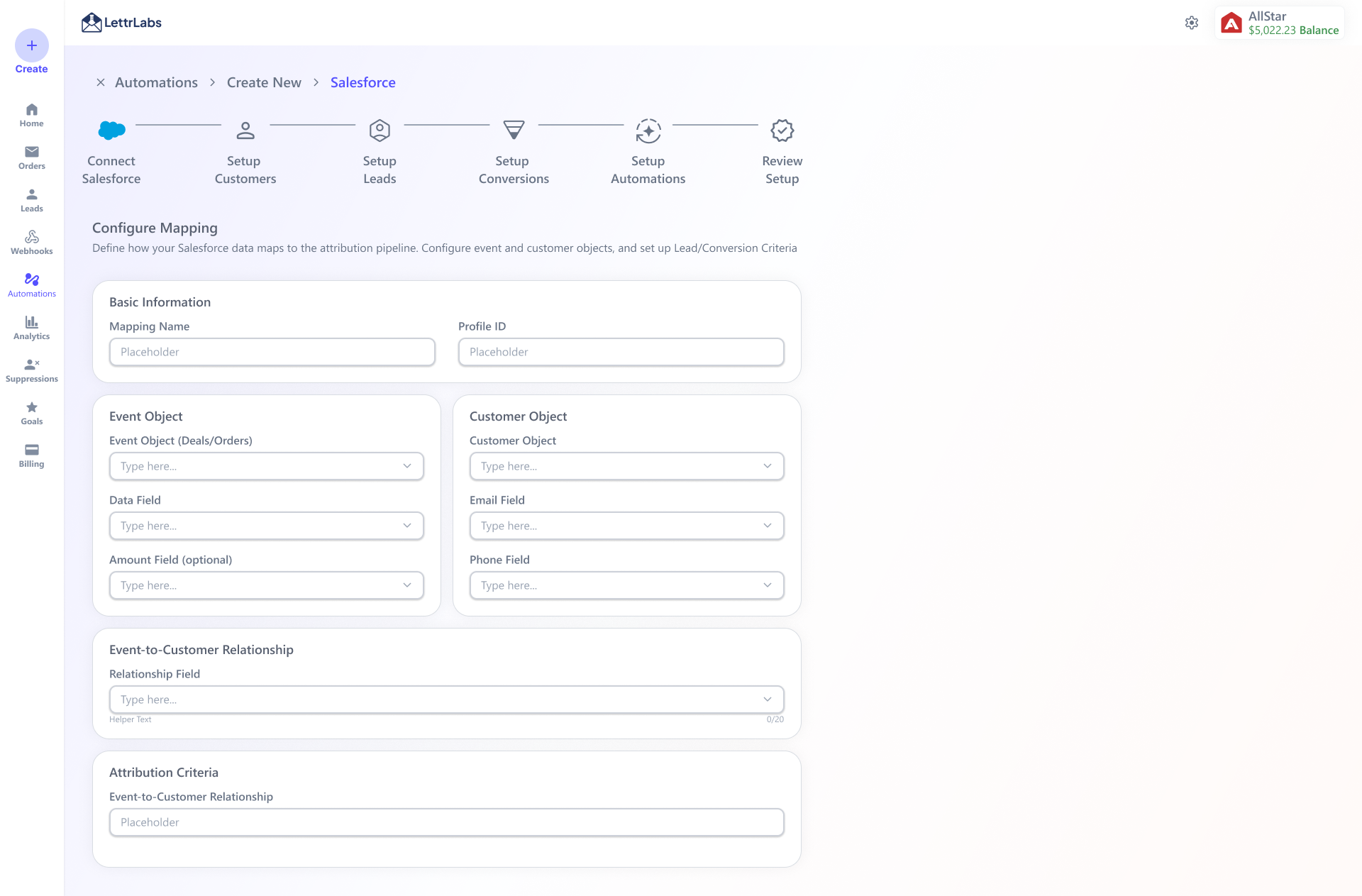
Not shipped · V1 · step 02
Hand-map every field.
Event object, customer object, and every field mapped by hand, plus the relationship between them. Precise, and a lot to ask before anything useful comes back.
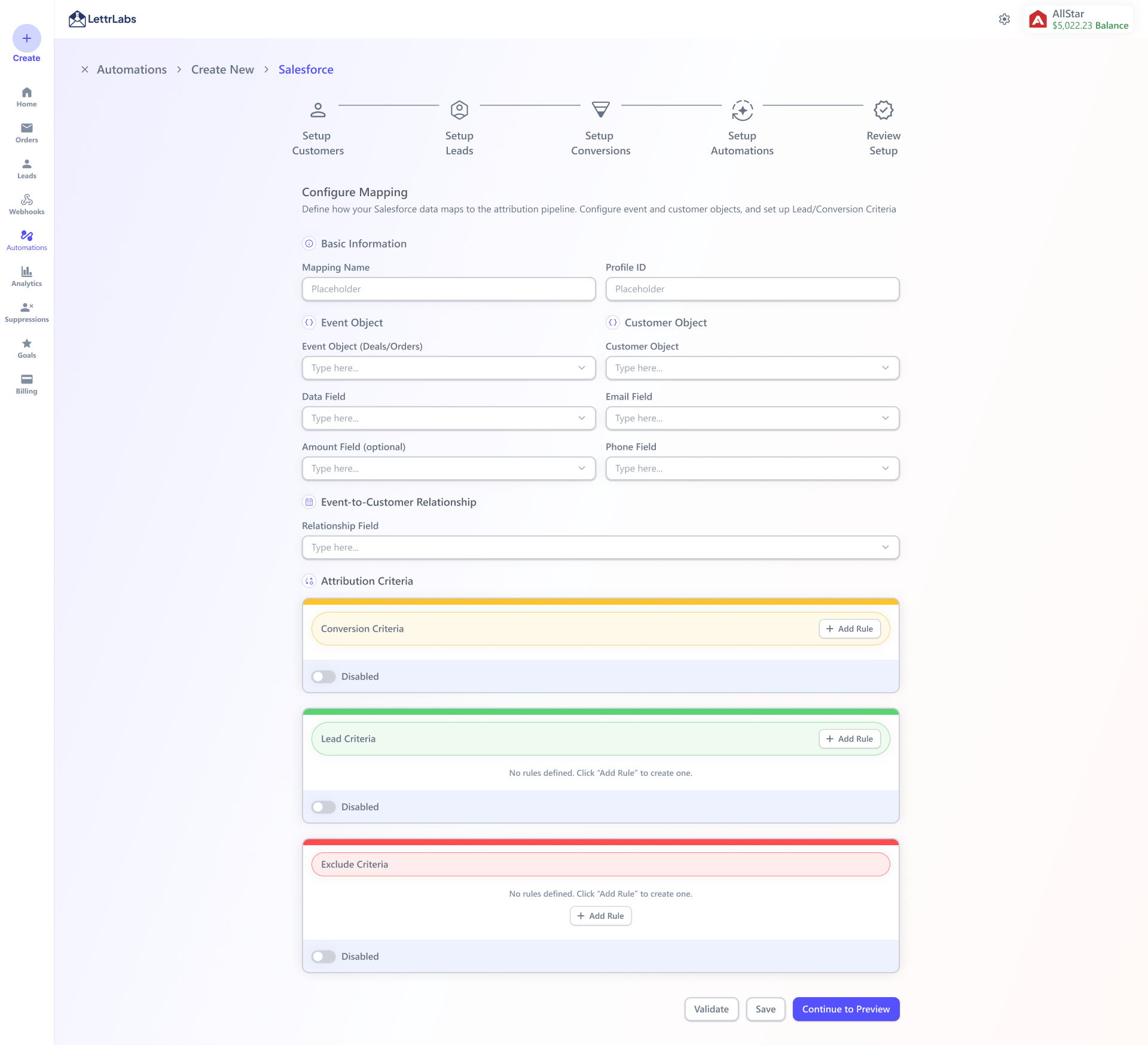
Not shipped · V1 · step 03
Build the attribution rules.
Conversion, lead, and exclude criteria. Each one a rule builder the user had to reason about up front, before they'd seen a single result.
Not shipped · V1 · step 04
Run a data pipeline.
Then run an extract-and-load pipeline into SQL, with a "skip dbt" toggle. Powerful, and plainly a data-engineering task.
Not shipped · explored
Auto-infer the field mappings.
Guess every mapping on connect and read it back as a filled-in review. It was elegant until custom objects and renamed fields showed up. Then guessing for people quietly guessed wrong on real Salesforce orgs.
Not shipped · explored
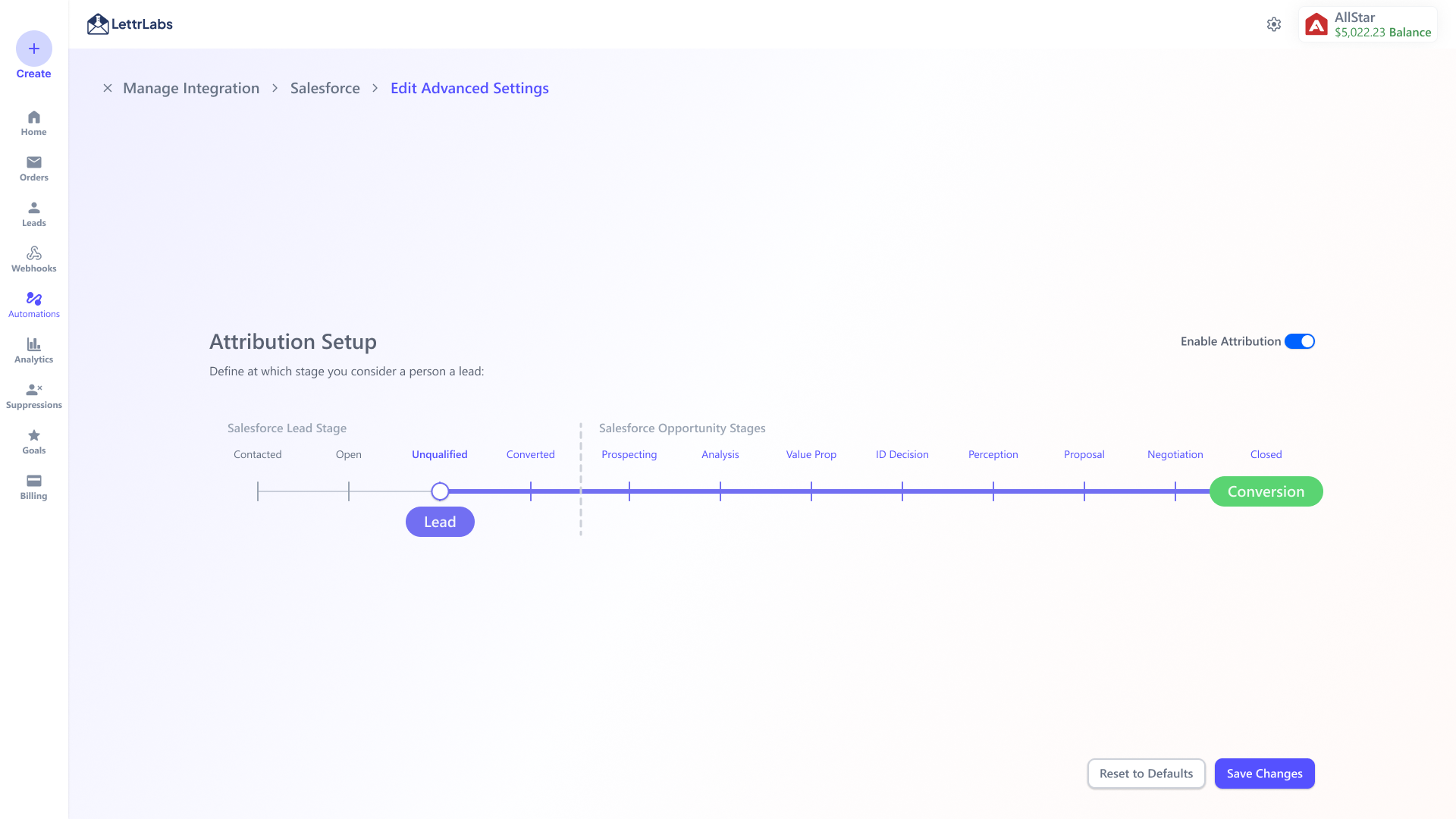
Attribution as one slider.
Drag a single handle across your Salesforce stages to say "a Lead starts here, a Conversion here." Lovely for one linear pipeline. Real orgs run several, across two objects, so it couldn't stretch to cover them.
What shipped
The least clever version held up. You connect with credentials, and attribution becomes its own explicit step. You confirm which statuses count as a Lead, a Conversion, or Job Complete, and a live warning fires if the choice would attribute nothing. A checkbox grid handles the pipelines and non-linear stages the slider couldn't.
That's the through-line of the whole project. The reusable pattern below is what's left after deciding what the user should never have to care about.
Comparison
The job
V1, powerful and complex
Shipped, simple and explicit
Find the data
Browse the full CRM schema and pick objects
Connect with credentials, and the connection exposes what's needed
Map it
Hand-map event/customer objects + every field
Confirm which statuses count, a few clicks
Attribution
Define conversion/lead/exclude rules up front
Confirm Lead / Conversion stages, warned if nothing would attribute
Move the data
Configure and run an extract-load (dbt/SQL) pipeline
The connection tests and syncs on its own
How it felt
Like data engineering
Like signing in
Product Strategy
Integrations
Six connectors already existed as one-off builds. The reusable pattern let us add four more in a single three-week run, Salesforce among them, asked for by a client worth ~500K mails. Each one is the same card and the same flow with a different source.
The four “New” connectors were added in the first 3-week run on the reusable pattern. The rest already existed as separate one-off builds.
Flow
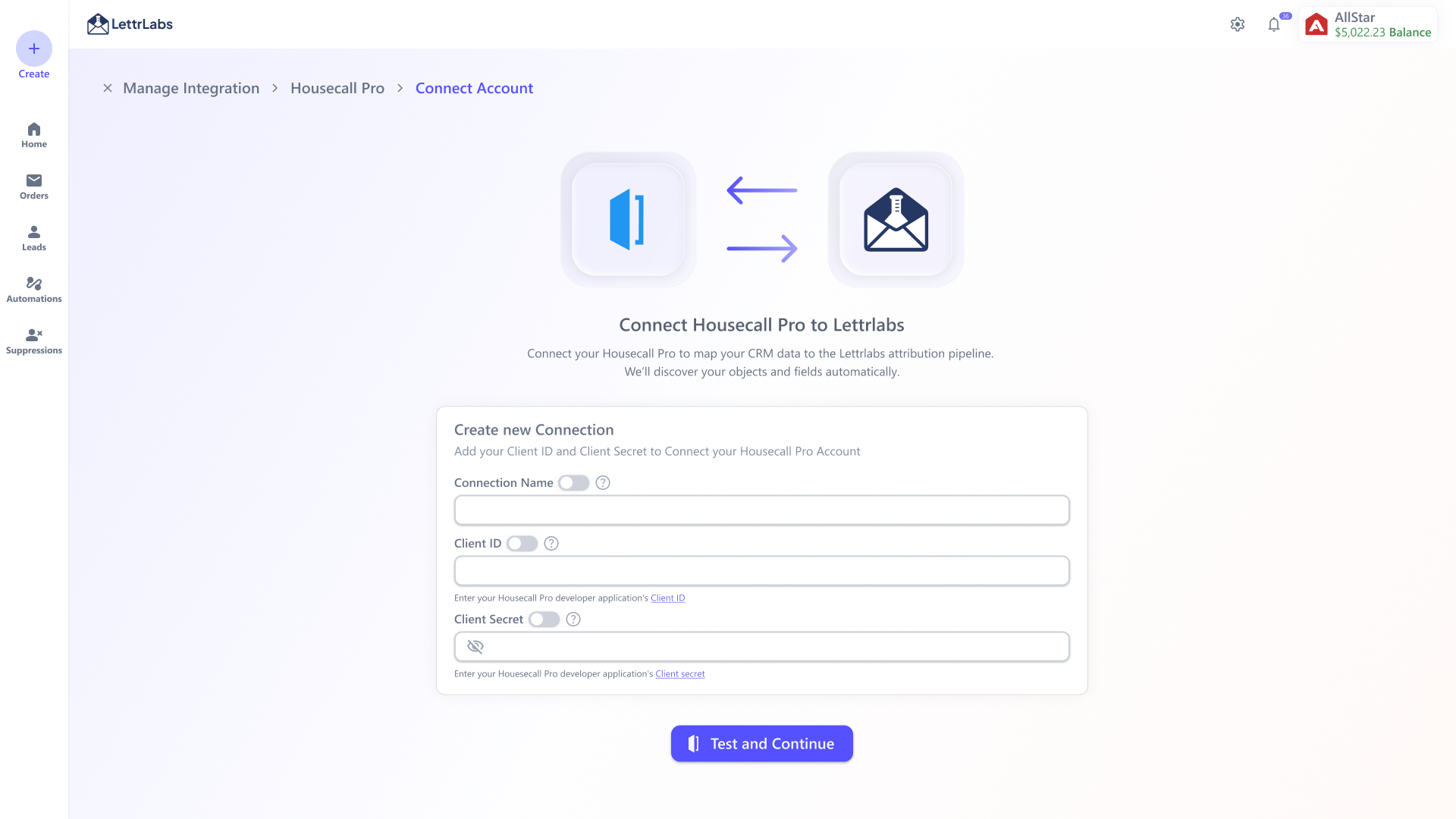
Here's the reusable pattern on a real connector, Housecall Pro. One entry point, a connect step that tests credentials before it moves on, clear connecting and connected states, a management list for multiple accounts, and attribution setup as its own job.
Final output · step 01
Create a new connection.
Only the essentials. Name, Client ID, masked Client Secret. Then Test and Continue before anything is saved.
Final output · step 02
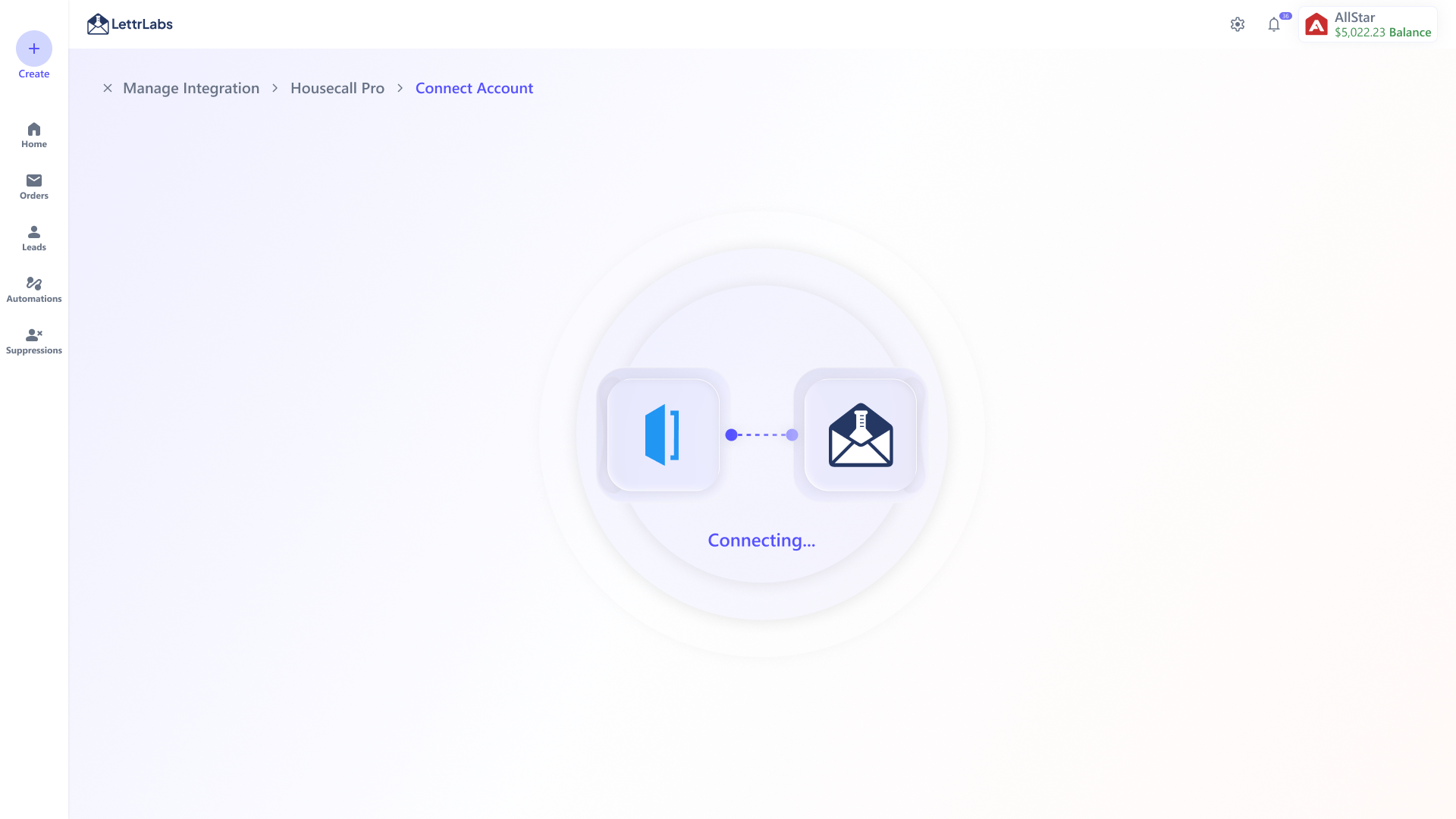
Connecting…
The wait says what it's doing. Credentials are being verified and objects and fields discovered, so it isn't a dead spinner.
Final output · step 03
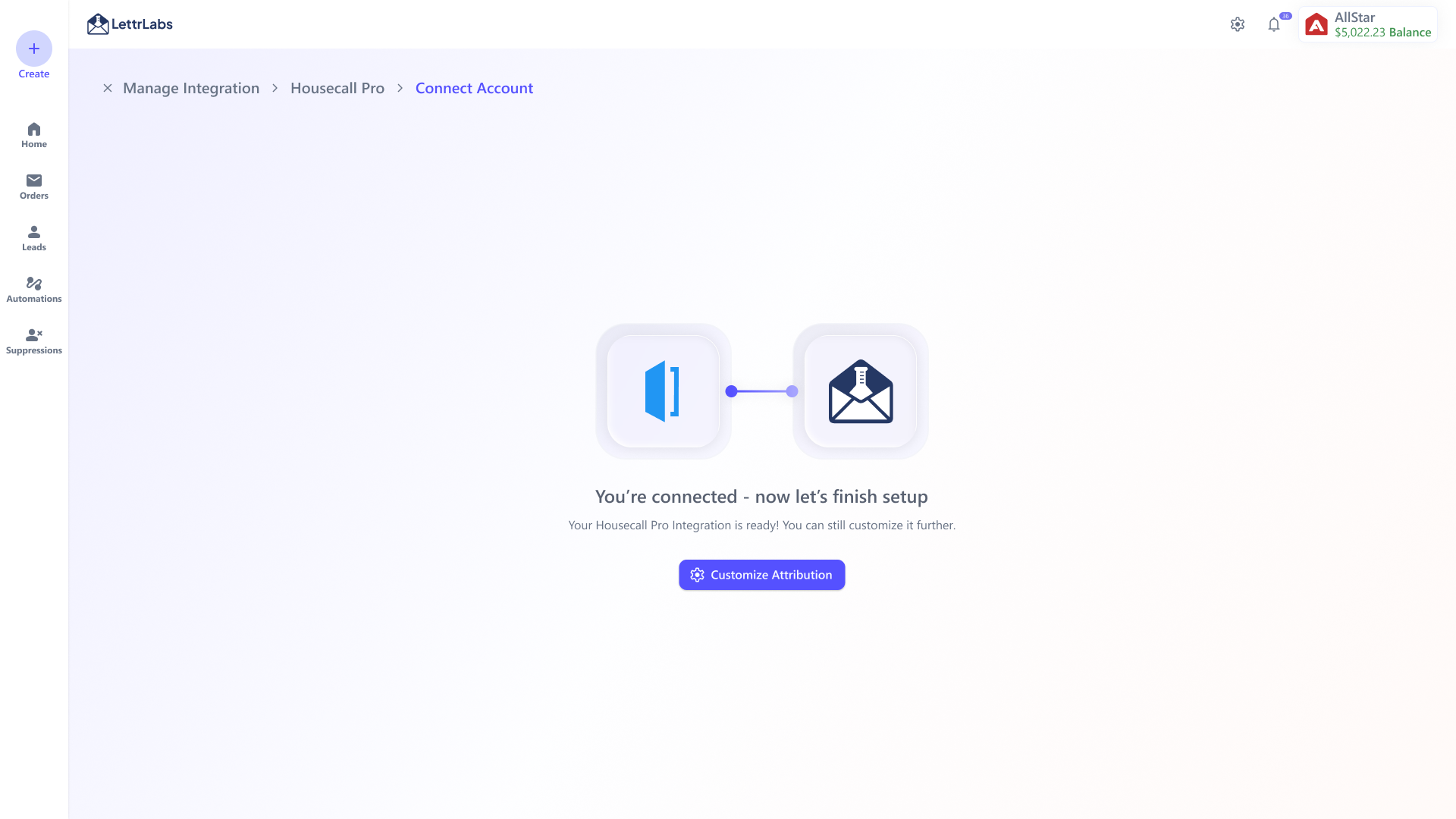
Connected → finish setup.
Success isn't the end. It routes straight to the next action (Customize Attribution).
Final output · step 04
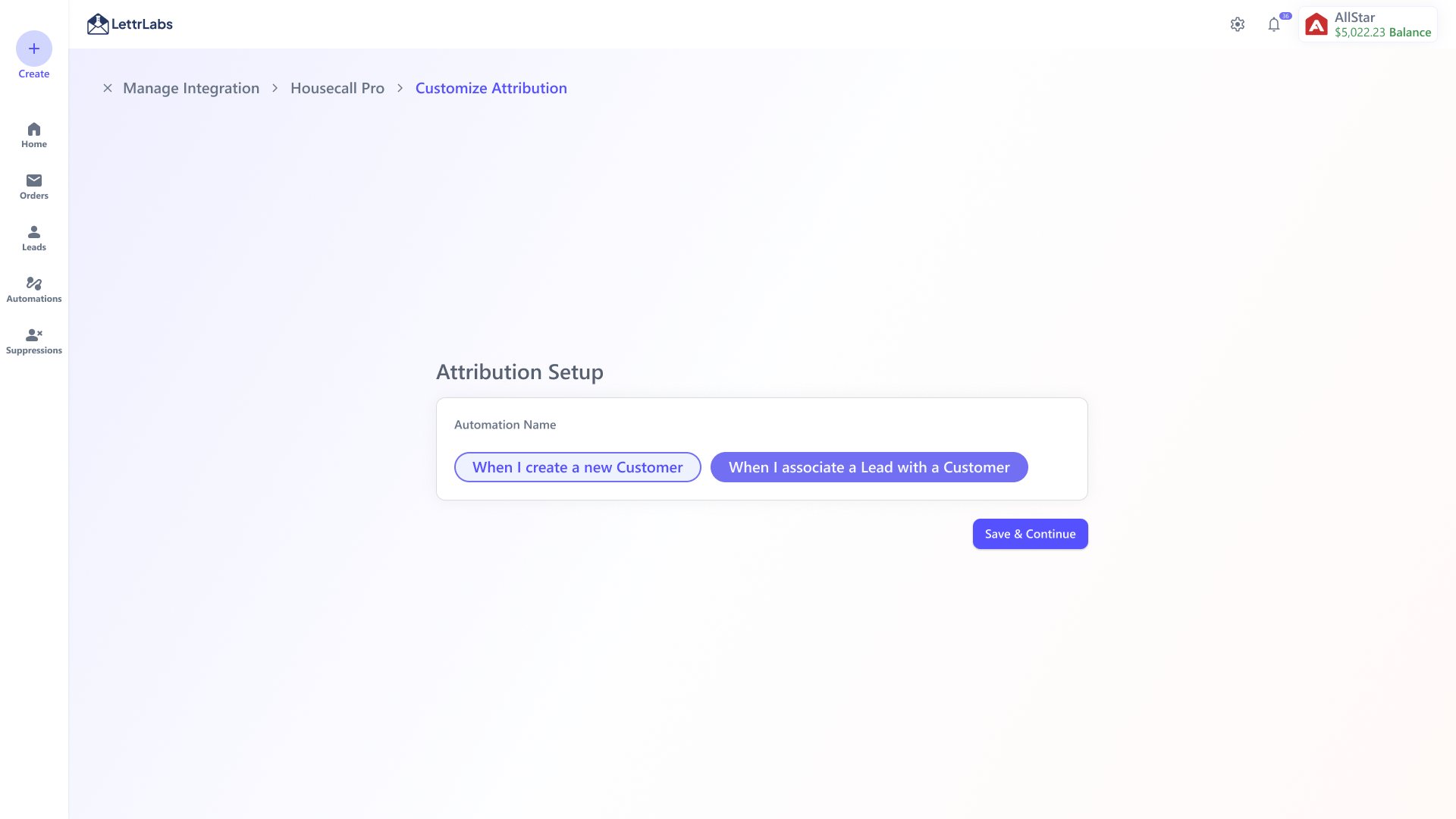
Attribution setup.
Configuration is its own step. Name the automation, pick a trigger, then Save & Continue.
Final output · step 05
Manage your accounts.
Every connected account sits on one surface with its status (Active / Sync in Progress), last sync, Finish Setup, Customize Attribution, Add New Account, and Remove.
Validations
The same pattern has to hold across very different APIs, so the safety lives in validation. It catches problems at entry instead of after a sync has already broken.
Field / step
Validation added
Why it matters
Connection identity & credentials
Name, format-checked Client ID, and a masked Client Secret are all required. The secret is never shown again after save.
Accounts stay easy to tell apart, and bad or exposed credentials get caught at entry.
Test before save
A live connection test plus object and field discovery have to pass before the user can continue.
No half-connected accounts, and failures show up early enough to recover.
Account identity & status
Tenant IDs are unique, duplicates are blocked, and every account shows its sync state with a last-updated time.
People can trust which source is connected and how fresh its data is.
Setup completion
Attribution is required before activation, and the automation has to be named and tied to a valid trigger.
Nothing launches on undefined, half-configured data.
Destructive change
Removing a connected account takes an explicit confirmation.
Changes that could hit live automations stay deliberate.
Trade offs
I wrote down what each call cost us, so the PM, engineering, and I could agree faster.
Question
Trade-off
Decision
Future
How much should the connect step ask for up front?
Exposing every object and field was powerful, but it turned setup into a data-engineering task. 3 in 10 users stalled before finishing.
Cut connect down to the few required inputs, name, Client ID, and masked secret, all tested before anything saves. Deeper mapping became a separate, optional step.
Use AI to pre-suggest field mappings so even the optional step gets faster.
Connect and attribution, one flow or two?
One flow felt continuous, but attribution carries different business logic and different risk than authentication.
Split them. Connect stays lightweight and works the same everywhere. Attribution is its own job, shown only to the users who need it.
Infer attribution defaults per connector, keeping the explicit step as the override.
Build each connector custom, or one reusable shell?
Custom screens fit each API perfectly, but every new app restarted design and engineering. That was 6 one-off builds at 3 to 4 weeks each.
One reusable lifecycle where logo, name, fields, and attributes are configuration, so a connector ships as setup instead of a redesign. Four shipped in a three-week parallel batch.
A connector "manifest" so a new source can be added with no new design at all.
Where should connection status live?
Keeping status on the detail page was simplest, but users lost track of what was active, syncing, or failed across many accounts.
Put status in the account list and in-app notifications, active, sync-in-progress, failed, or ready, instead of on one screen.
Proactive alerts when a sync breaks, before it silently pauses an automation.
Outcome
The workflow finally matched how the business, engineering, and customers actually add a source. That mattered more than a prettier connect screen.
CUSTOMER · SHIPPED FLOW
A clearer path to connection
The shipped connect → test → confirm → manage flow checks credentials before save and spells out each next action. Completion rate and ticket reduction are what we still need to confirm with live usage.
Business
A routine, not a project
Lead time per connector went from 3 to 4 weeks down to ~2, and the first parallel batch shipped 4 new connectors in three weeks. One of them was the Salesforce connector a ~500K-mail client was waiting on.
Engineering
One workflow to reuse
Instead of researching and building each connector from scratch, engineering slots new sources into a stable lifecycle where logo, name, fields, and attributes are configuration.
Platform
A reusable base for the next connectors
The reusable pattern shipped across four new connectors, Salesforce, ServiceTitan, HubSpot, and Housecall Pro. It's built so future sources arrive as configuration rather than a redesign.
SUPPORT · BASELINE
Setup was the next measure
The baseline was 16 setup tickets a month and 3 in 10 users unable to finish on their own. The new flow has a clear measurement plan behind it. Connection completion, setup tickets, and time to first automation.
PLATFORM · NEXT
Connection enables the next workflow
The framework links account setup to attribution, automation, and analytics. The chance now is to grow the $350K/month integration-data base with more completed, well-configured connections. I won't claim that growth before it's measured.
Reflection
I assumed at first that connecting an integration would need a lot of fields and a lot of visible configuration. After working the flow through with the team, the simpler answer turned out to be the better one. Ask for only what's essential, validate it clearly, and let the backend do the hard part.
"This project taught me that good platform design isn't about showing all the data. It's about knowing which data matters, hiding the rest, and making the next integration easier than the last."
Future update
Version 2 would tighten syncing status, add better search for integrations, support more credential types, and use AI to help preselect fields for automation, data merge, and attribution setup.