Quick Summary
The problem
Billing sat on the money itself. 3 enterprise accounts sat behind ~75% of revenue, each running 95 live automations that a payment issue could interrupt. It had already cost real money. 14 tickets this year were payment issues that halted automations, and there was ~$158K in overspend across three incidents. A ~$2M prospect named org billing as a requirement to join.
My part
Designed the billing & spend flows. That covers transfers and balance purchases, adding and removing payment methods, payment access & caps, in-flow access requests, and spend analytics, all sitting on the org backbone of nested hierarchy, inherited permission, and no structural change without first showing what it breaks. I worked with a PM, a Staff Designer, and engineering on the payment actions.
The outcome
Caps and budgets are designed to stop the overspend happening again. The shipped flow makes transfers and balance purchases self-serve inside the product. The projected 1½- and 3-minute task times are click-level estimates I still have to validate with live accounts. Org billing also answers a requirement a prospect named.
Billing was the hardest surface in org management. Money, permissions, and live automations all collided in one place. I designed the money-movement and spend flows: transfers and balance purchases, adding and removing payment methods, payment access and caps, in-flow access requests, and spend analytics. Our Staff Designer designed manage billing group and disbursement. Engineering worked with me on the org-level payment actions. It reuses the backbone from the org study, which is nested hierarchy, permission that inherits down, and no structural change without first showing what it breaks.
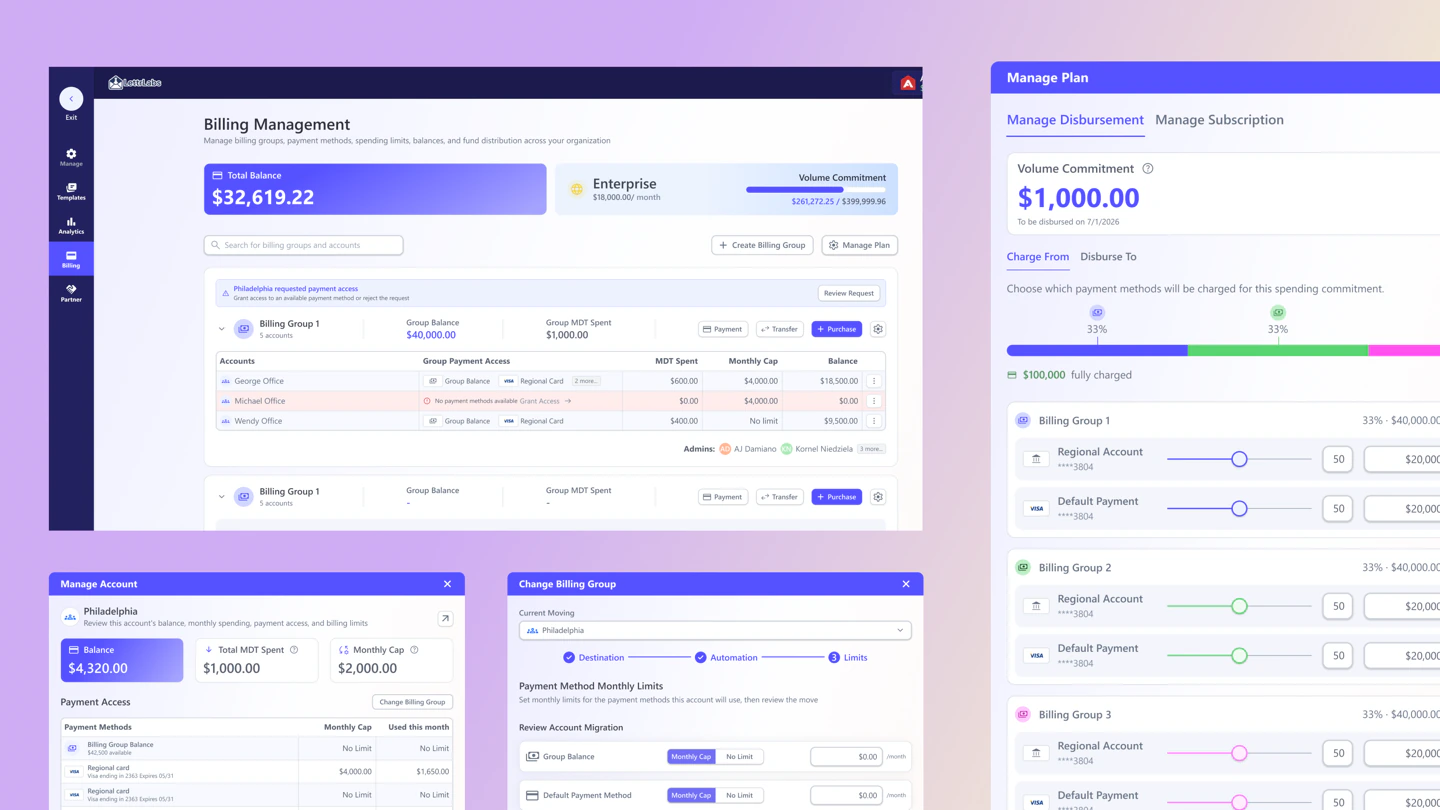
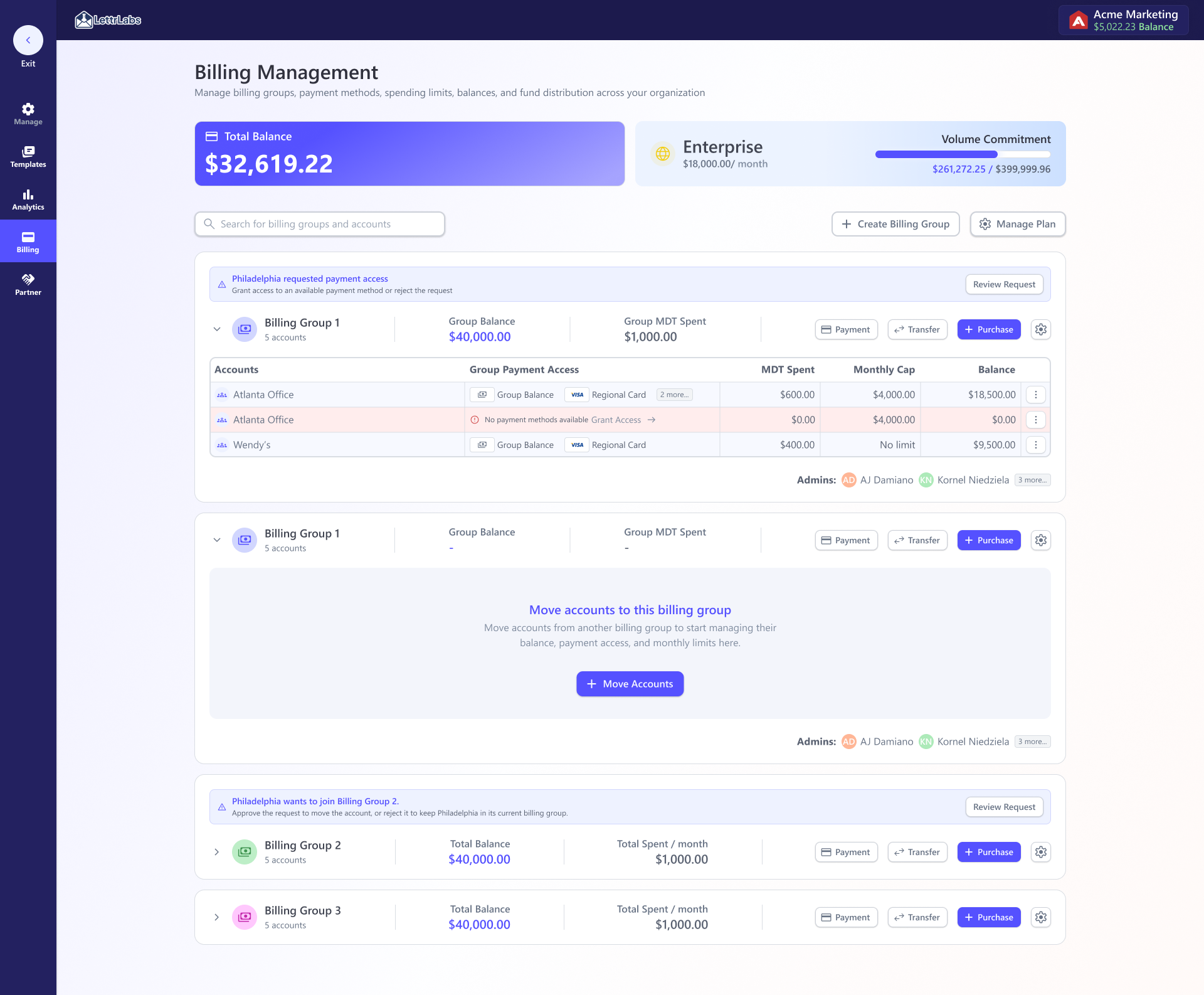
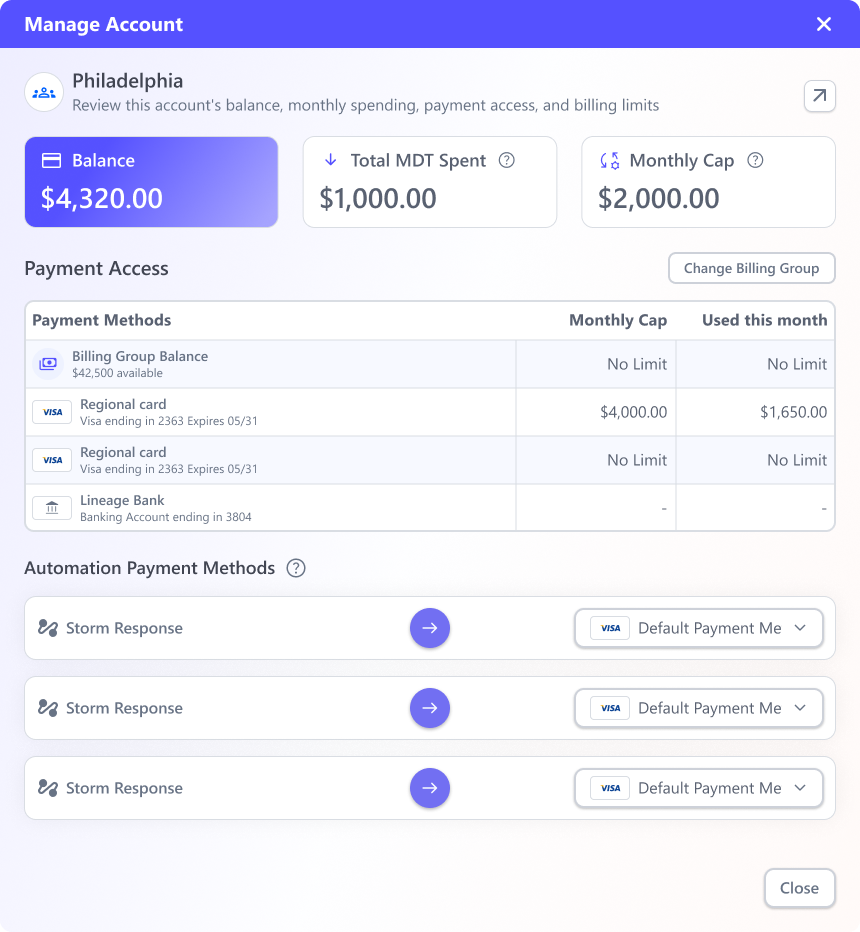
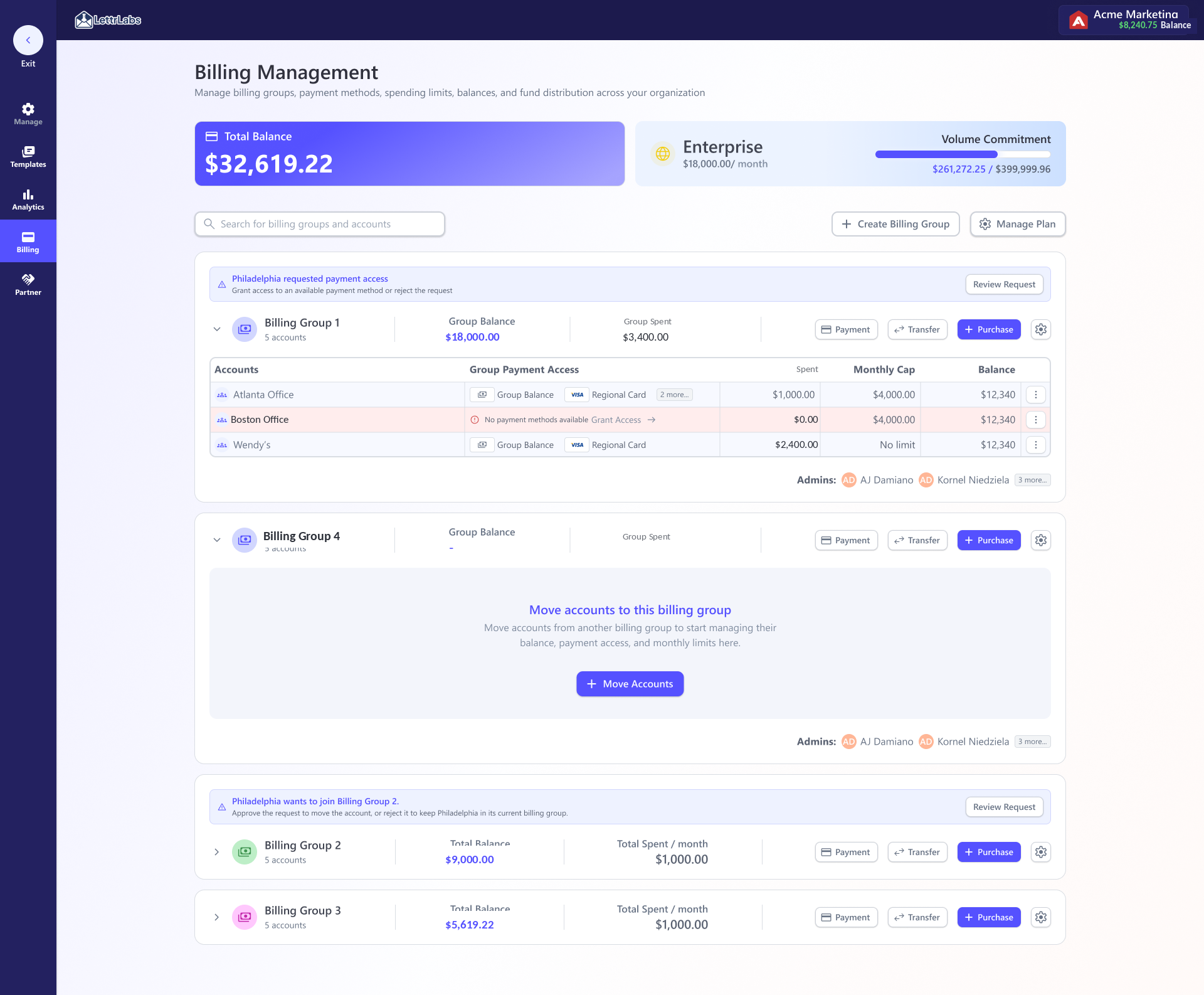
Total org balance and enterprise volume commitment sit up top. Each billing group shows its accounts, payment access, monthly caps, balances, and pending access requests. Transfer and purchase happen inline.
Discovery
Data
~75%of revenue in the 3 enterprise accounts this served
95live automations per account that a payment problem could interrupt
~$2Mpotential revenue from a prospect that named org billing as a requirement to join
~$158Koverspend across 3 incidents that caps & budgets are built to prevent
14payment-issue tickets that halted live automations this year
1 to 3 days → minsfund transfers & balance purchases, designed for self-service (was a CS/eng ticket)
Tickets
- 13 Fund transfers between teams
- 2 Payment-method routing by function (automation, single order, mailing-list)
- 2 Aggregated payment history & receipts for the org
Logged from the three enterprise accounts. CS brokered every one of them by hand on a 1 to 3 day turnaround. Three of the four accounts, counting the incoming prospect, explicitly asked for billing aggregation.
Signal
What the data showed
Live automations that can't pause
The three enterprise accounts each run 95 active automations. A payment problem doesn't just annoy people. It stops revenue. 14 support tickets this year were payment issues that halted some of those automations.
Overspend that already happened
Nobody could set their own limits, so budgets got blown. That happened three times this year, ~$158K in unintended spend. Customers wanted guardrails as much as they wanted access.
The decision this forced
The two facts pulled opposite ways. The overspend argued for hard limits everywhere. The automations that can't be paused argued against any cap that could halt a paying campaign. So caps stayed optional guardrails instead of mandatory ones. The real protection is structural. It's multiple billing groups, each with multiple payment methods, so one declined card can't take down a campaign.
What that reframed: the job moved from "let enterprises pay themselves" to "let them route, cap, and protect money so a payment issue can't stop a live campaign, and nobody overspends by accident."
Journey
Billing looked like a payments screen. The more I studied the flow, the less that held up. The real problem was trust and permissions. How do you let a customer move real money across their own teams without us in the loop, and without one payment slip pausing a live campaign?
So I reframed it. What we were actually designing was how an organization routes, caps, and protects money it's actively spending, not a place to pay.
Expected
1
The org moves its own money
An enterprise should be able to shift budget between its own teams the moment it needs to, with no ticket and no middleman.
2
Guardrails they set themselves
Admins cap what each account spends and route methods by function, so budgets hold without asking us to intervene.
3
Protect spend continuity
The model is built to lower the odds that a payment issue interrupts a live, paying campaign, and to show what a change does before it's committed.
Reality
1
They email us to move money
Every transfer or balance purchase routed through Customer Success and engineering. High-level access on real money, done by hand.
2
1 to 3 day turnaround
A support ticket, triage, a dev or director-level lead, then a wait. All the while the customer's budget sat where they didn't want it.
3
Overspend and stalls
With no self-serve guardrails, budgets blew. That was ~$158K across three incidents, and 14 payment-issue tickets halted live automations this year.
Process
Money is where permissions collide
A template edit affects designs. A billing change affects money that's actively being spent. An enterprise pre-funds a volume commitment, splits it across billing groups, caps each account, and points specific automations at specific payment methods. Change any of that carelessly and a running campaign loses its funding and pauses. That's why the design had to show every consequence before an admin commits.
The other half was legibility. A CFO wants the whole org's spend. A regional admin should see only theirs. The same hierarchy and permission rules from org management do that work here, applied to dollars instead of roles.
The demand was specific
The three enterprise clients behind roughly 75% of company revenue asked to manage their own org instead of routing every change through us. A prospect we're pursuing (~$2M in potential revenue if it signs) named org billing as a requirement to join. Our PM and CS team ran the interviews. I worked from their findings, the logged requests, and the support tickets.
Money flow: pooled balance
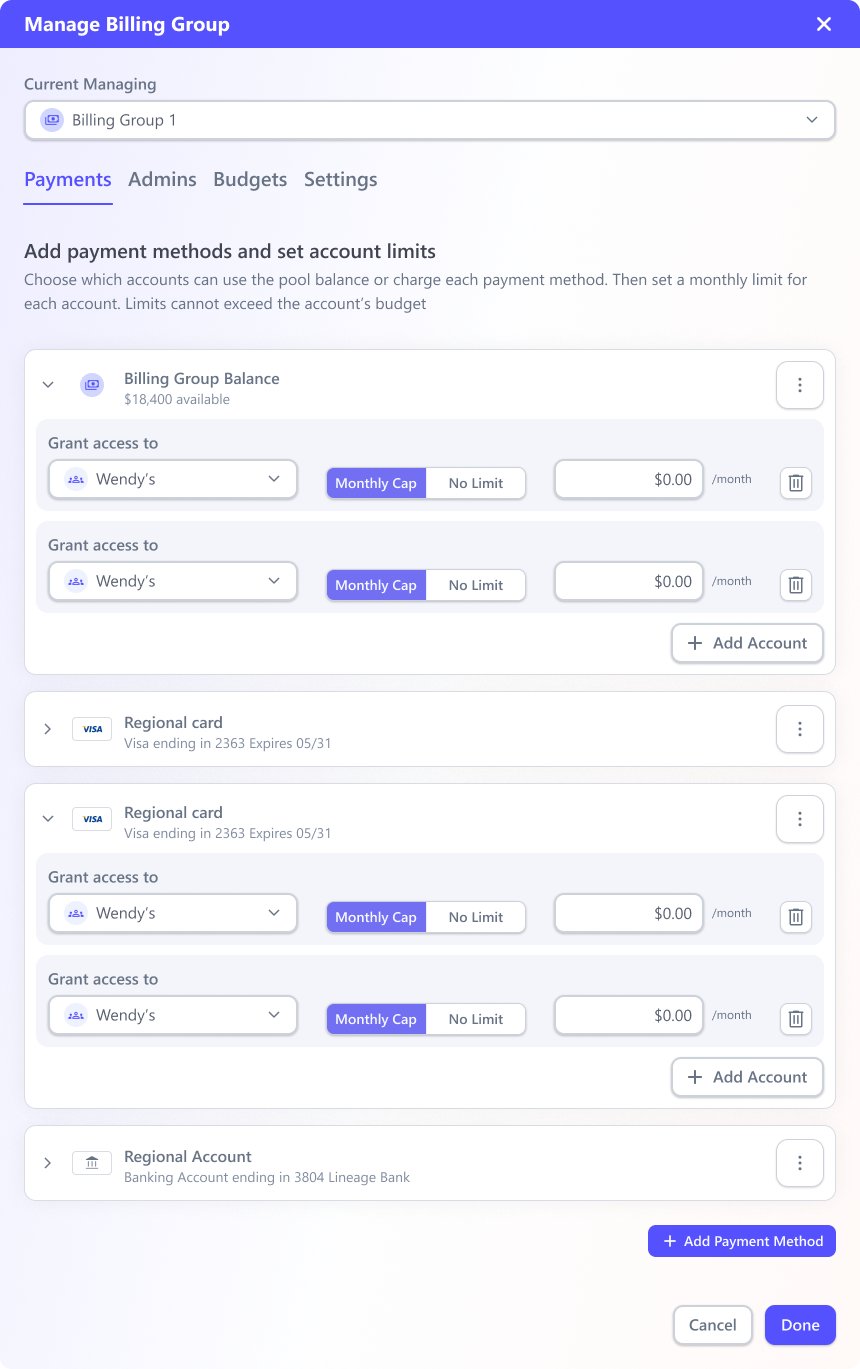
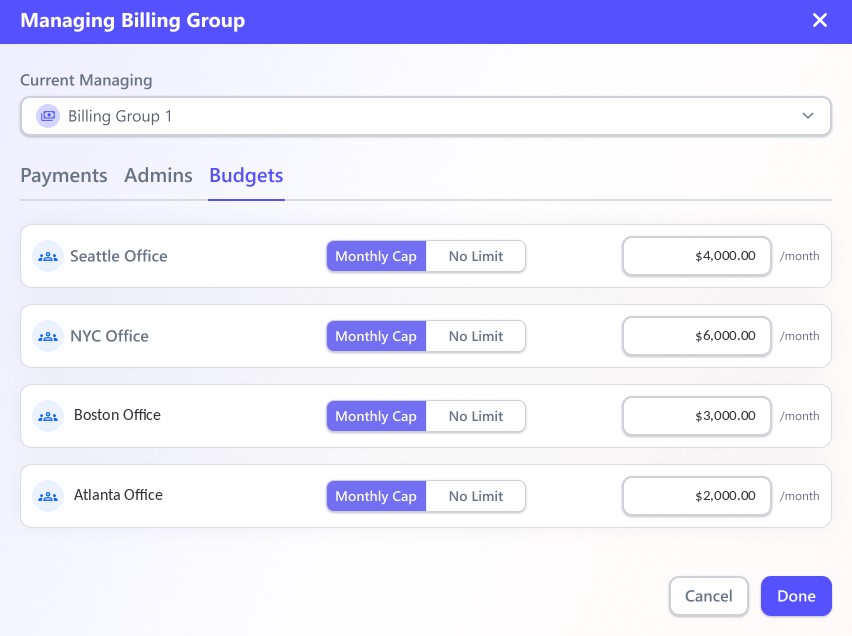
The org holds a total balance and, for enterprises, a monthly volume commitment. Admins create billing groups, often one per campaign or region, then nest groups inside them, attach one or more payment methods, and set how much each account can spend.
I kept two things deliberately separate: who spends (the org tree) and what pays (the funding source). An Account points to a Billing Account, so one funding source can serve many.
Who spends
OrganizationTotal balance · volume commitment
↓
Billing groupPer region / campaign · nestable
↓
AccountMonthly cap (≤ group budget)
funded by
→
one funds many
What pays
Billing AccountHolds payment methods & rules
↓
Payment methodsCard · bank · invoice
Product Strategy
Strategy: why a separate Billing Account
The obvious first model was a 1:1 binding where a team is its payment. Each Group or Team would carry its own cards and money would live on the team. It was fast to build, so we looked at it first. But it couldn't represent how enterprises actually pay, so I split funding out into its own object.
One source, many accounts
A shared card or credit line is entered once on the Billing Account and reused, instead of re-adding it to every team.
Routing by function
Because payment is its own object, an Account picks which method covers which work. One card for automations, another for single orders, another for a mailing list.
Reconciles for finance
Enterprises run different legal entities or banks by state. Anchoring money to the paying entity keeps history, receipts, and tax clean, and a change in one place updates every Account at once.
The extra object earns its keep. At five levels of nesting, editing payment on every team is exactly where costly mistakes and paused campaigns come from. Separating funding from spending removes that whole class of failure.
Features
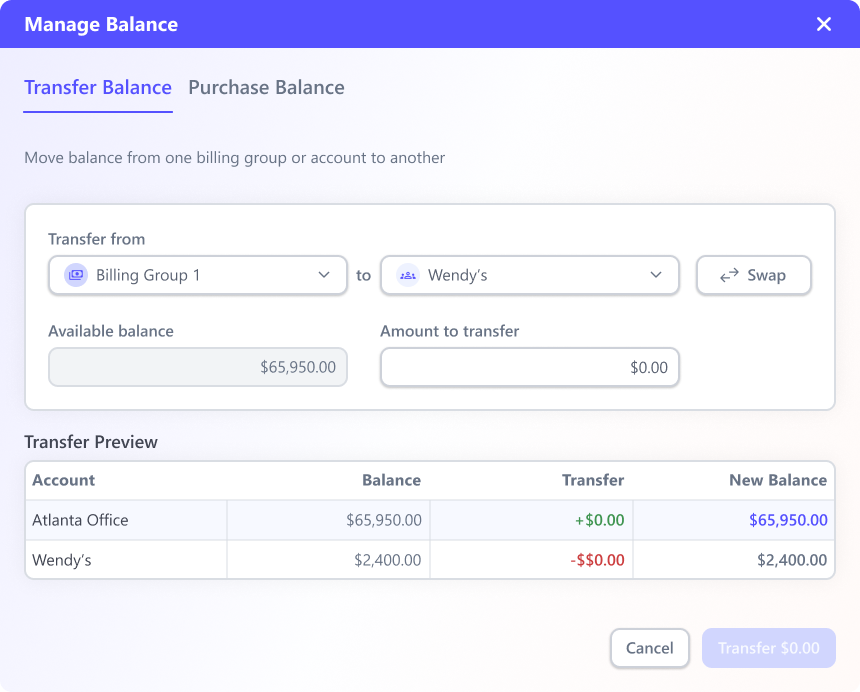
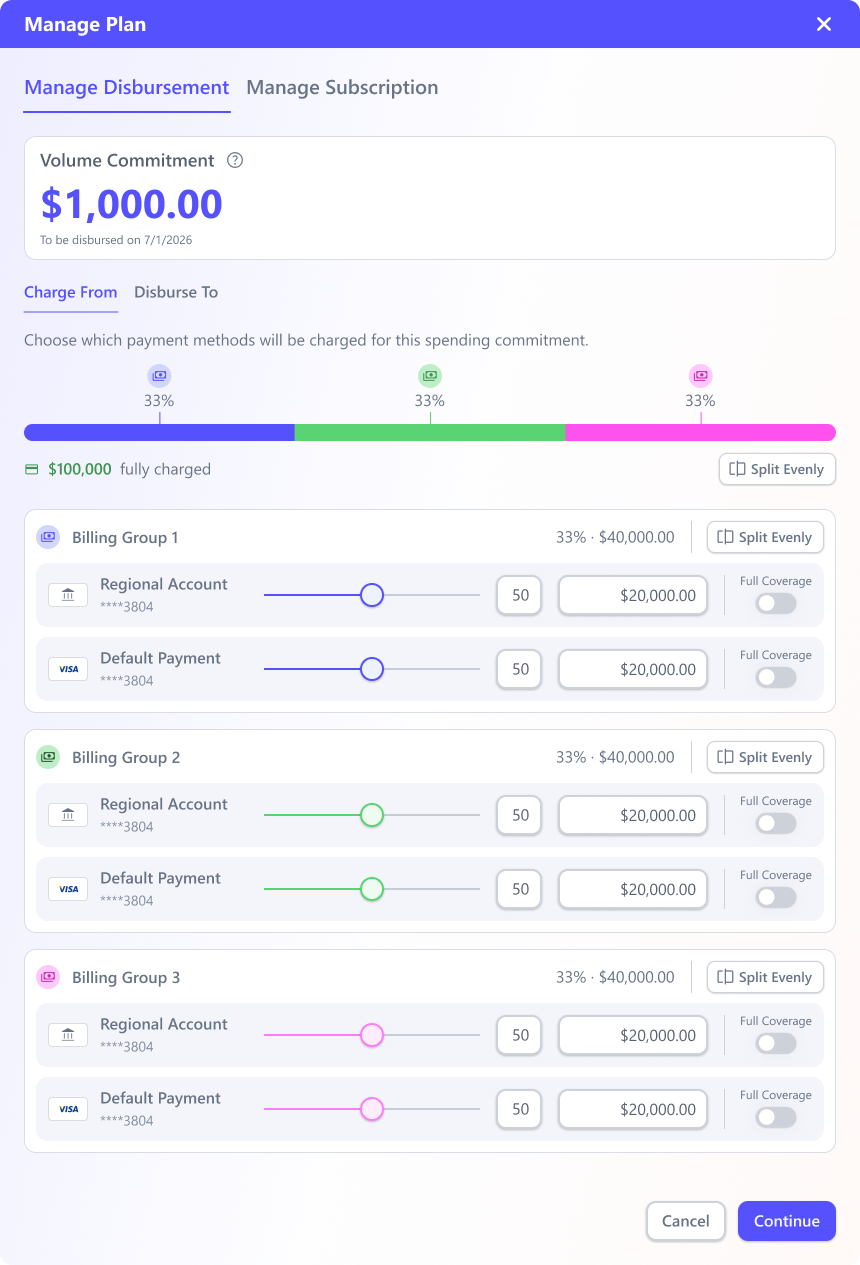
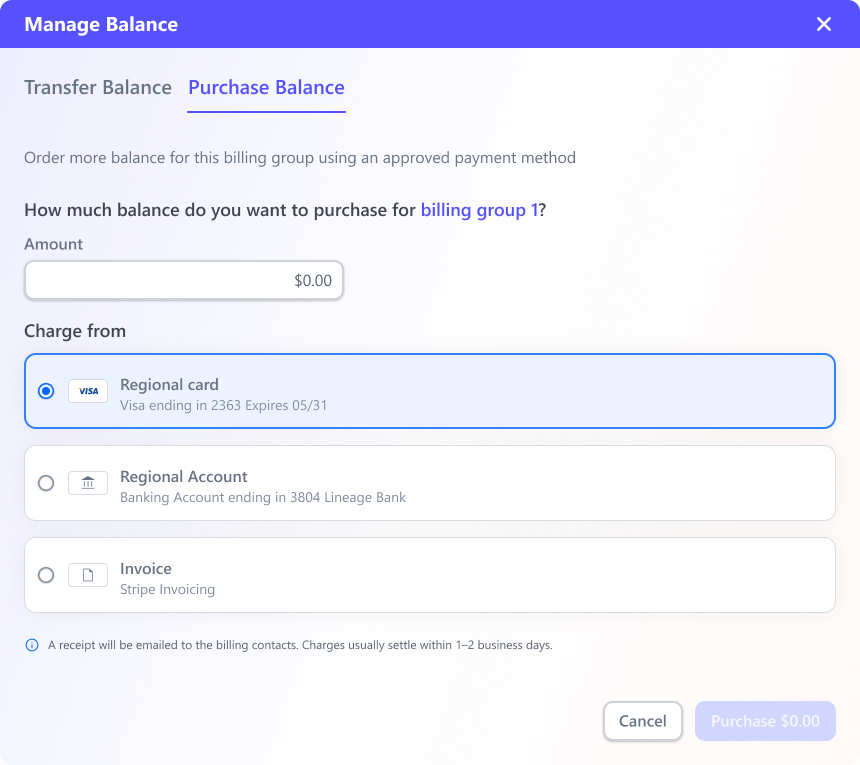
Setting up a group, moving money, protecting a live campaign, reading spend. It's one billing surface seen from different jobs. Filter by what you need to do, then click any screen to open it full-size.
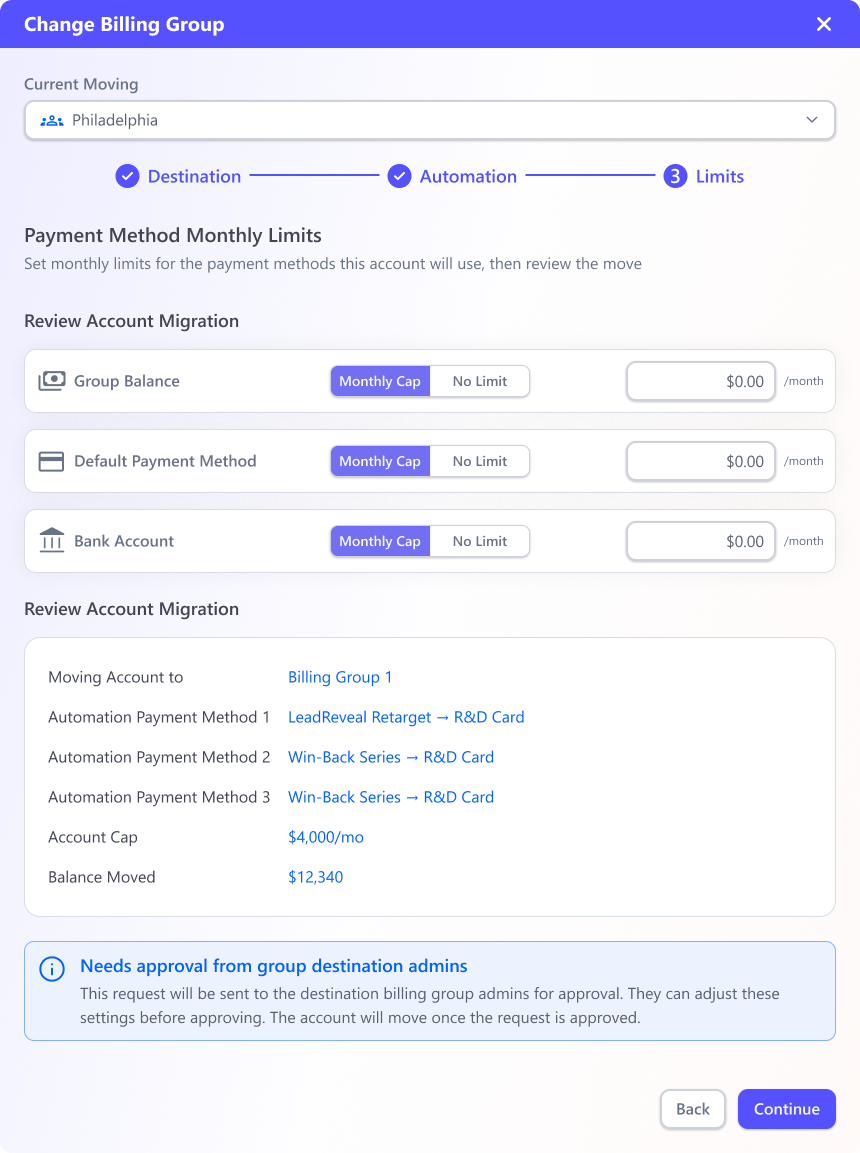
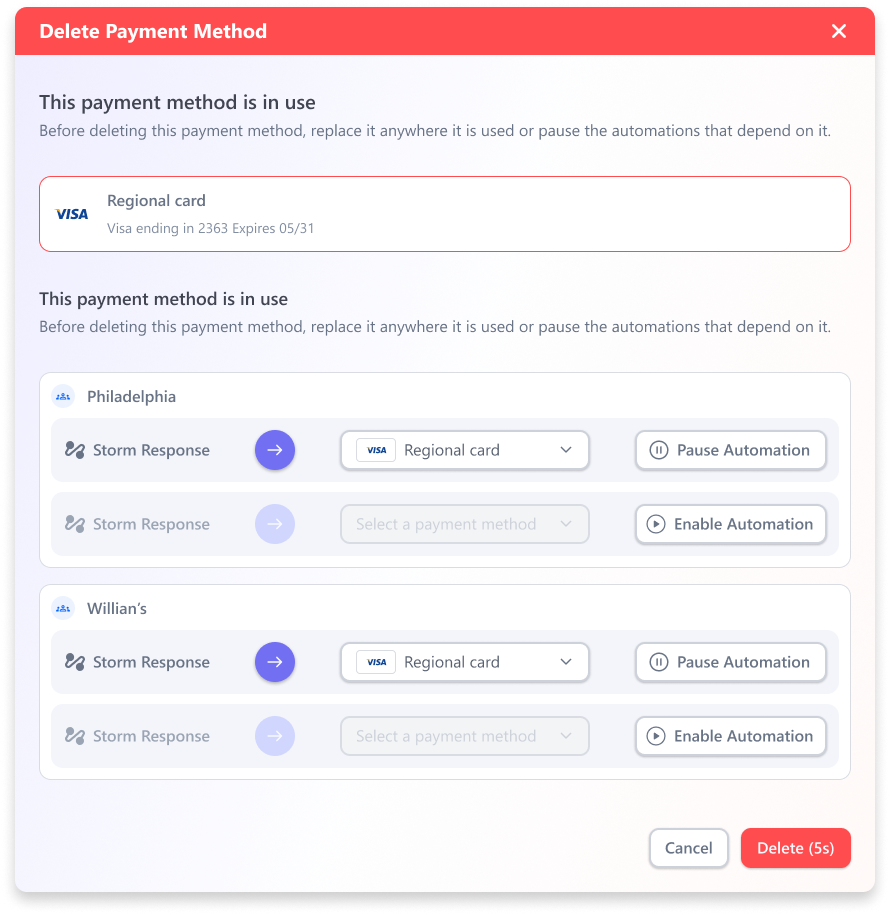
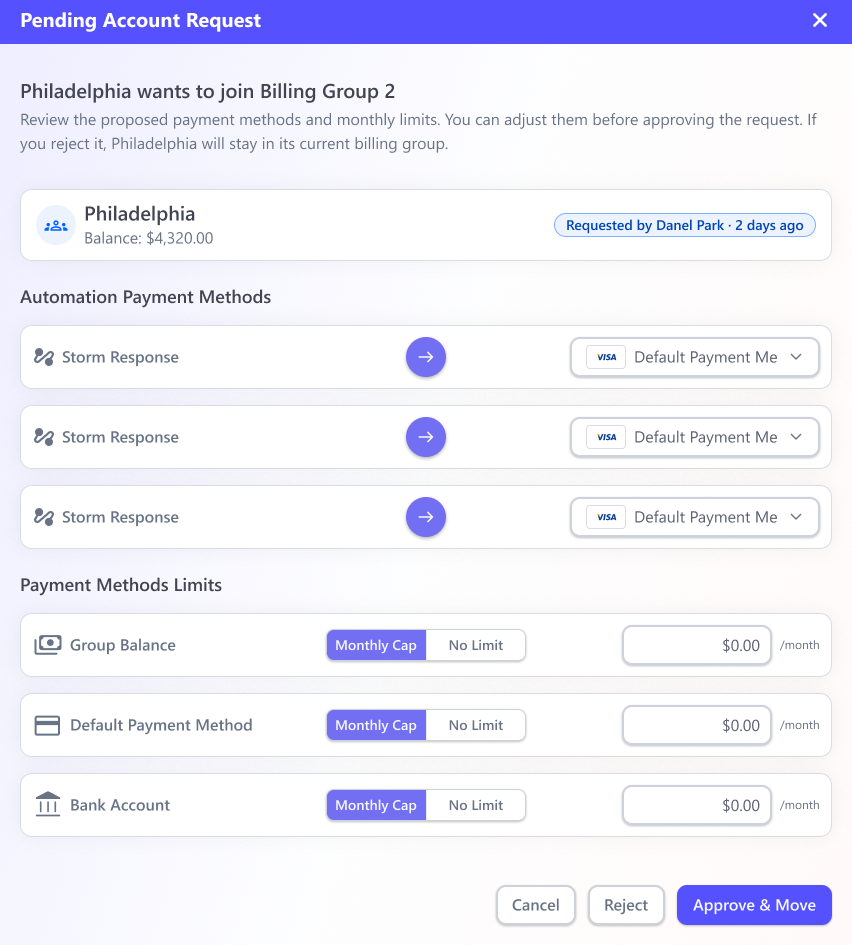
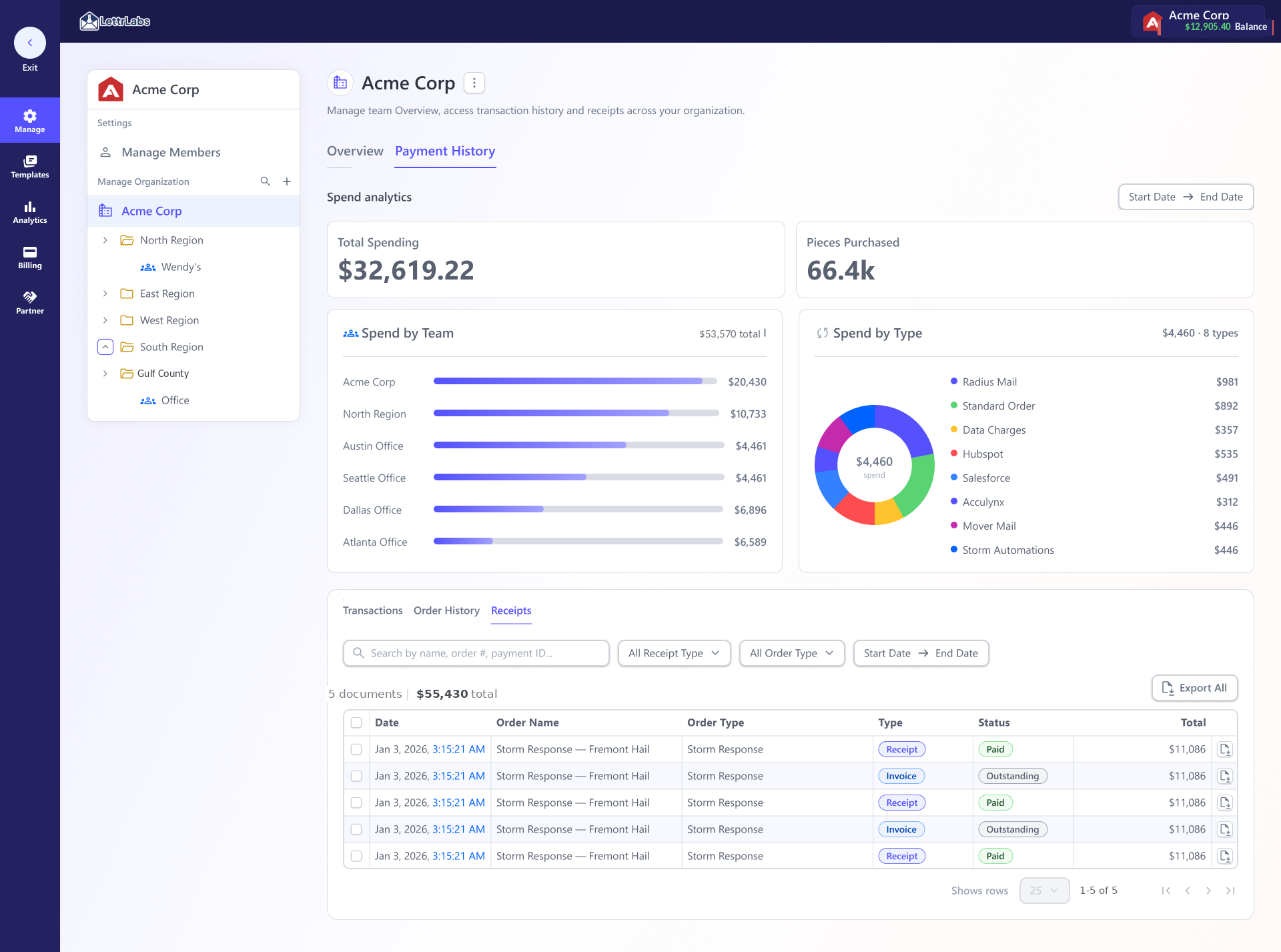
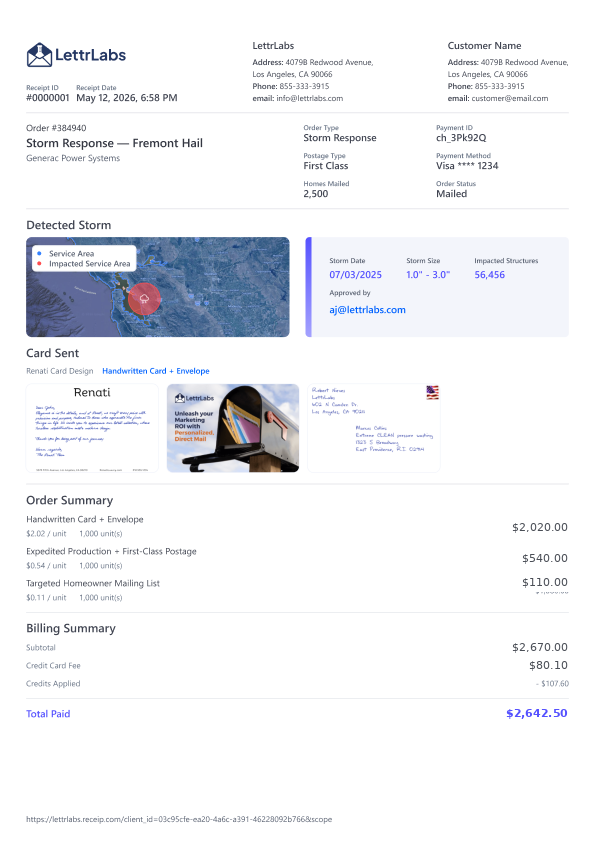
Draft idea: rejected vs shipped
Rejected: payment on the team (1:1)
- Payment methods sit directly on each Group or Team. The team and its money are the same object.
- A team can pay only one way, and a funding source can't be shared across teams.
- Finance can't separate who spent from what paid, so receipts and tax don't reconcile.
Shipped: a Billing Account as its own entity
- A Billing Account holds the payment methods and rules. Any number of org Accounts can point to it.
- Spending ("who") and funding ("what pays") become separate objects that reference each other.
- One funding source can serve many accounts, and per-account limits draw against it.
Trade offs
Money runs on systems with hard limits like Stripe, fund verification, and settlement. Each pushback turned into a decision, with a trade-off you can see and a path forward.
Question
Trade-off
Decision
Future
Should caps be mandatory?
Hard caps stop overspend but could halt a paying campaign.
Optional guardrails plus structural redundancy, meaning multiple billing groups × multiple payment methods, so one declined card can't take down a live campaign.
AI-suggested caps from an account's past spend.
How do you change a payment method?
Stripe won't let a saved card's number be edited in place.
Make adding effortless. Every "change" is really adding a new method and repointing the automation, so the limit turns into a fast path instead of a wall.
Broaden supported credential types.
When are new funds spendable?
Show funds instantly, but they aren't verified yet.
Balance and receipt show at once but sit in "Pending verification," unspendable until they clear. Nobody spends money that isn't confirmed.
Clearer settlement-time estimates.
Is a commitment a balance?
One number is simpler but misleading.
Show the volume commitment and the spendable balance as two distinct figures, so "committed $100k" is never mistaken for "$100k I can spend right now."
Nothing queued.
Three principles run under all of it
Prevent, don't undo. Money moves are effectively irreversible, so the UI shows every affected automation before a delete or transfer commits. Make invalid states impossible. A cap can't be set above its group's budget, and remaining balance shows live while you set it. Offer only what a role can do. Money actions split into tabs by permission, so requests don't fail.
AI workflow
Design system
Billing has a lot of states: empty groups, capped accounts, pending requests, in-use methods, split allocations. What mattered is that AI drafted those states from the design system's own components and our shared Markdown (.md) specs, the same components and voice-and-tone docs behind the Figma system. So the states stayed aligned with that system instead of turning into one-off mocks. (These ran as HTML prototypes. The coded React version came later, on my own, after I was let go, and that's the design-system case study.)
That freed the team up for the flows that carried real risk, the money-moving and destructive ones. I'm usually the one bringing AI into the workflow. I test Figma Make, Codex, Claude's design tooling, and MCP, push them past production output into usability, research, and discovery, then write down what works. On the org and billing surfaces our Staff Designer and I worked through it together and split the tasks between us. Our Senior PM built three of his own prototypes from the same specs. It's still a workflow we're refining.
Read the design system case study →component-specs.md
One source of truth
Components, tokens, and rules authored once in the Figma system, so every AI-drafted billing state used the real components instead of a one-off mock that would drift from that source of truth.
validations-branches.md
States & logic
Relevancy checks, validations, conditional branches, and state flows covering empty, capped, pending-verification, in-use, and split allocation, all drafted with AI from the same specs behind the design system.
ux-copy.md
First-draft copy
A machine-readable voice-and-tone reference produced first-draft UX copy for each billing state that already sounded like the product, so the AI passes stayed aligned with the Figma system.
Accessibility
A money screen is the worst place for an inaccessible control, and permission-and-spend screens are exactly where it gets skipped. Because the rules live in the design system, it was a constraint from the start. Billing met WCAG 2.1 AA. (Ratios sampled from the shipped LettrLabs UI.)
Contrast
13.6:1 primary text AAA
16.1:1 nav on dark AAA
7.2:1 muted text AA
4.8:1 button label AA
Built in
Keyboard-operable
Visible focus
Never color alone
Errors tied to the field
Screen-reader checked
Outcome
Before and after
The old paths ran through the LettrLabs admin panel and backend. The shipped model brings the same actions into the product. Task-time estimates and adoption are still launch measures.
Money action
Before: email & wait
After: self-serve
01Transfer funds between teams
Email CS → triage → tag a dev or director → transfer in the internal panel → wait 1 to 3 days.
Blocked · 1 to 3 daysOpen the Org Admin Panel, pick billing group from → to, confirm.
Self-serve · ~1½ min02Purchase balance
Email the CTO / Director of Sales → discuss → Stripe link → pay → charges settle → available in 1 to 3 days.
Waiting · 1 to 3 daysManage Balance → Purchase Balance → pay by card, bank, or Stripe invoice. Shows at once, spendable once verified.
Self-serve · ~3 min03Route payment by function
Ask us to point specific automations at a specific card, by hand, on the backend.
DependentPer-account method routing set in the billing group. One card for automations, another for orders.
In control04Protect a live campaign
A failed or removed card silently pauses the automations it funded, and you find out after the fact.
At riskDelete names the affected automations and gates on swap-or-pause first, behind a delete delay.
Protected05Reconcile spend
Request aggregated history and receipts through a support ticket.
ManualRoll-ups by team and type at any level, with exportable itemized receipts and invoices.
LegibleBacking the time claim
I built a rough keystroke-level (KLM) model of the shipped transfer flow: point, select the "from" group, select the "to" group, enter an amount, confirm. That comes to roughly 15 to 20 seconds of active interaction using the standard KLM operator times (Card, Moran & Newell, The Psychology of Human-Computer Interaction, 1983). Add the admin's own thinking, verifying the amount and double-checking balances, and the whole task lands around 1½ minutes end to end, against a 1 to 3 day CS turnaround. (I enumerated the KLM operators with AI to sanity-check the cost before build.) It's a click-level estimate and not a stopwatch. Actual completion times will be validated in Hotjar once enterprise accounts are live.
Billing model result
The outcome is a clearer in-product path for money moves on a surface that carries the revenue. Adoption, completion time, and ticket reduction are the post-launch measures.
-
SELF-SERVE · PROJECTED
Minutes, not days
The shipped flows put budgets, caps, transfers, and balance purchases inside the product. The projected task model estimates transfers at ~1½ minutes and a purchase submission at ~3 minutes, against 1 to 3 business-day CS requests (purchased funds then clear in 1 to 2 days). All three enterprise accounts are expected to self-manage billing at launch. The estimate still needs validation with live accounts.
-
REVENUE · PROJECTED
Built for the base, and on the next deal's must-have list
These flows serve the three accounts behind ~75% of revenue. The prospect we're pursuing, ~$2M in potential revenue if it signs, named org billing as a requirement to join (three of four accounts explicitly asked for billing aggregation). It was a named requirement, not a nice-to-have.
-
SAFETY
A pattern that protects revenue
Multiple billing groups and payment methods are designed to reduce single-payment-failure risk across the 95 live automations each account runs. Budgets and caps go after the failure pattern behind 14 payment-issue tickets and ~$158K across three incidents. Their impact is a post-launch measure.
-
VISIBILITY
Spend leaders can trust
Roll-ups by team and type with exportable receipts and invoices gave finance one legible view instead of a support ticket. That covers the aggregated payment-history requests that were part of the demand.
-
DESIGN SYSTEM
0 → 45 components, 3 md specs
The billing surface drew from a Figma design system taken from 0 to 45 components with 3 Markdown spec files. Those are the same components and specs AI prototyped from, which cut roughly ~30% off design time (internal estimate) and kept drafts aligned with the Figma system.
-
SCALE
17 requests, addressed at the model level
The 17 logged self-management requests are handled structurally rather than one by one, so the same billing model can carry the 95 automations per account as the enterprise base grows.
Reflection
Billing carried the most states and the highest stakes, and it shows. Some flows, like disbursement and resolving affected automations before a delete, are powerful but still ask a lot of the admin. If I went back to it, I'd collapse the multi-step money moves into fewer, clearer decisions while keeping every consequence visible. The model underneath is the part I'd keep.
"Anyone can draw a transfer dialog. The real work was the model underneath it. Pooled money, scoped access, and safeguards designed to protect a paying campaign from funding interruptions that never had to happen."
Future update
With more time, I'd let AI pre-suggest budgets and caps from an account's past spend, so setup starts from a sensible default instead of a blank field. I'd also push the analytics deeper and show budget against ROI, so admins can see where to put more money. That turns billing data into a business tool rather than a ledger.